Let’s get one thing straight: Instagram doesn’t have a giant red “DELETE HUMAN” button (probably for the best).
But you can remove followers, block people, and tighten your privacy so your account feels less like a public park
and more like a cozy living room with a very picky bouncer.
In this guide, you’ll learn exactly how to remove followers on Instagram, when to block versus
restrict or mute, and how to handle spam, bots, and “I’m just here to lurk” energywithout
turning your profile into a drama documentary.
Quick Definitions (So We Don’t Accidentally Start a Social War)
- Remove follower: They stop following you. No notification. They may re-follow (especially if you’re public).
- Block: Strongest option. Cuts off access and interaction. Also removes them from your follower list.
- Restrict: “You can stay, but you’re on silent mode.” Their comments may be hidden and messages are less intrusive.
- Mute: For your own peace. You stop seeing their contentwithout changing what they see.
- Private account: New followers must request approval. Great for controlling who follows you going forward.
How to Remove a Follower on Instagram (The Polite “No, Thanks”)
Removing a follower is the cleanest way to stop someone from following you without going full “blocked for life.”
It’s ideal when you want less visibility from someone but don’t want to escalate the situation.
Method 1: Remove a Follower from Your Followers List (Mobile App)
- Open Instagram and go to your profile.
- Tap Followers.
- Find the account you want to remove (scroll or use search).
- Tap Remove next to their name.
- Confirm when prompted.
What happens next? They’re no longer following you, and Instagram generally doesn’t send a notification that you removed them.
If your account is public, they can re-follow immediately. If your account is private, they’ll need to send a follow request.
Method 2: Remove a Follower from Their Profile (When You’re Already There)
- Go to the person’s Instagram profile.
- Tap the three dots (menu) in the top corner.
- Select Remove follower (wording may vary slightly by device/app version).
- Confirm.
This is handy when you notice someone weird in your story viewers or DMs and want to take action while you’re already on their profile.
How to Block Someone on Instagram (The “Absolutely Not” Option)
Blocking is for when you want a hard boundary: harassment, creepy behavior, persistent spam, fake accounts,
or someone who keeps returning like a sitcom character nobody asked to see again.
Block from Their Profile
- Open their profile.
- Tap the three dots.
- Tap Block.
- Confirm.
Block from Messages (DMs)
- Open your DM thread with the person.
- Tap their name at the top of the chat.
- Choose Block (or go through the options menu).
- Confirm.
Important: Blocking generally removes the account from your followers (and often breaks mutual following).
It’s the fastest way to “remove + prevent re-following” in one move.
Remove vs. Block: Which Should You Choose?
Choose “Remove Follower” when:
- You just want them off your follower list, but it’s not serious enough for a block.
- You’re trying to avoid conflict (family, coworkers, acquaintances).
- You don’t mind if they can still view your profile (public accounts) or request again (private accounts).
Choose “Block” when:
- The account is harassing you, spamming you, or making you uncomfortable.
- You want to prevent them from interacting with you entirely.
- You’re dealing with repeat offenders (new accounts, strange DMs, aggressive comments).
Think of Remove as closing the door, and Block as changing the locks.
Both are valid. Your peace is not “being dramatic.” It’s being functional.
What If You Don’t Want Drama? Try “Soft Blocking”
“Soft block” is a common strategy people use when they want someone removed as a follower without the long-term commitment of a block.
The idea is simple: you block them briefly (which removes the follow), then unblock them.
How Soft Blocking Typically Works
- Go to their profile and Block them.
- Wait a moment.
- Go to your blocked list and Unblock them.
After that, they’re usually no longer following youbut you haven’t kept them blocked.
Heads up: If your account is public, they can still find you and re-follow.
If your account is private, they’ll have to request again, which gives you control.
Restrict, Mute, and Other “Less Nuclear” Options
Instagram isn’t just “remove or block.” If you want to limit someone’s impact without them noticing immediately,
these options can be the sweet spot.
Restrict (Great for “I Don’t Want to Hear You, But I Also Don’t Want a Scene”)
- Their comments may only be visible to them unless you approve.
- Message notifications can be less disruptive.
- It quietly reduces their ability to bother you in public spaces like comments.
Mute (Great for “You’re Not the Problem, I’m Just Tired”)
- You stop seeing their posts/stories in your feed.
- They still see your content normally.
- Perfect for avoiding content overload without making it personal.
Hide Your Story from Specific People
If your main concern is story viewers (hello, random coworker from 2019), you can hide your story from selected accounts.
This is often less intense than removing or blocking and helps you keep your audience where you want it.
Close Friends (Control Who Sees the “Real” You)
Want to keep your account public-ish but still share personal stuff selectively?
Use Close Friends for stories and keep the “inner circle” content away from casual followers.
How to Stop People from Following You Again (Privacy Settings That Actually Help)
Make Your Instagram Account Private
If you’re repeatedly removing followers and they keep coming back like a sequel nobody greenlit,
switching to a private account is the most effective long-term fix.
- Go to your profile.
- Tap the menu (three lines).
- Go to Settings (or “Settings and activity,” depending on the app).
- Find Account privacy.
- Toggle Private account ON.
When you go private, existing followers still remain followersso you may want to do a cleanup pass:
remove any unwanted followers, then enjoy the blissful silence of “follow request pending.”
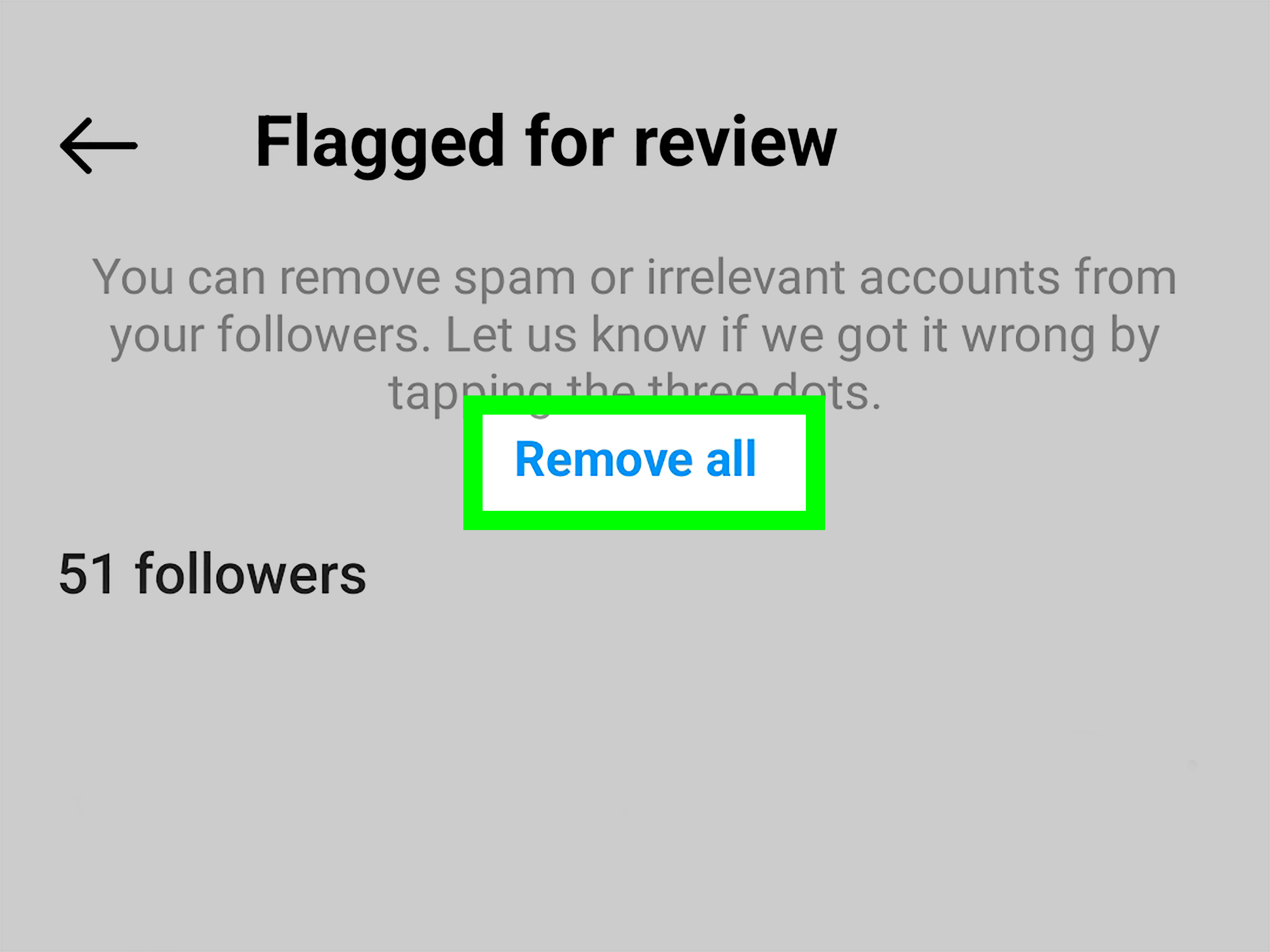
How to Remove Spam, Bots, and “Ghost Followers”
Not all followers are real people. Some are bots, some are spam accounts, and some are “ghost followers”
(inactive accounts that never engage). If your follower count looks healthy but engagement is mysteriously low,
cleaning up can help your account feel more authentic.
Common Signs of Fake or Spam Followers
- Zero posts, weird username, random numbers, or copy-paste bio.
- Following thousands of accounts with very few followers.
- Suspicious comments (“Send pic on DM,” “Promote it on @___,” “Crypto mentorship,” etc.).
- Brand-new accounts with no profile picture or generic stock images.
What to Do About Them
- Remove follower if you just want them gone.
- Block if they’re actively spamming, commenting, or DM’ing.
- Report if the account is impersonating someone, scamming, or violating policies.
- Go private if the spam keeps coming in waves.
Bonus safety tip: be suspicious of “follower management” apps that ask you to log in with your Instagram credentials.
Many security reports and consumer-tech outlets warn that sketchy “free followers” apps can lead to account compromise.
If you value your account, treat your login like a house key: don’t hand it to strangers offering “engagement growth.”
Step-by-Step Examples (Because Real Life Isn’t a Flowchart)
Example 1: Your Account Is Public, and an Ex Starts Following You
If you remove them, they can re-follow instantly. If you want them out for good, block is cleaner.
If you want minimal confrontation, you could remove them and switch to privatethen they’ll need to request.
- Option A: Block (fastest, firmest)
- Option B: Remove + Make account private (quiet but effective)
- Option C: Restrict (if you don’t care that they follow, but don’t want interaction)
Example 2: A Bot Follows You and Starts Commenting “Promote It”
Don’t negotiate with robots. Block + report is usually best. If you’re seeing many bots,
consider tightening privacy settings or reviewing suspicious follower activity more often.
Example 3: A Coworker Follows You and You Want to Post Freely
If you don’t want office small talk about your weekend story posts, you have options that don’t involve open conflict:
- Hide your story from them (surgical and discreet)
- Close Friends for personal stories
- Remove follower if you want a clean separation
FAQ: Deleting Followers on Instagram (The Stuff People Whisper-Search)
Will someone know if I remove them as a follower?
Instagram generally doesn’t send a notification when you remove a follower.
But if they check your profile or notice your posts stopped appearing, they may figure it out.
Can I remove followers on Instagram if my account is public?
Yes, you can remove followers. The difference is: on a public account, they can simply follow you again right away.
If you want to prevent that, consider switching to private or blocking them.
Does blocking remove them from my followers list?
In most cases, yesblocking cuts off access and typically removes follower/following connections.
What’s better: restrict or block?
If safety, harassment, or repeated boundary-crossing is involved, block.
If you just want less noise without escalation, restrict.
Can I remove multiple followers quickly?
Instagram is designed for manual controlgreat for intentional cleanup, not great for mass removal at lightning speed.
If you try to do too much too fast, you may hit temporary action limits. Pace yourself.
Common Mistakes to Avoid (So You Don’t Make Things Worse)
- Relying on shady third-party apps: If it asks for your password, think twice. Security risks are real.
- Removing a follower but staying public: They can come right back. Private + remove is more effective.
- Forgetting your story settings: Sometimes you don’t need to remove anyoneyou just need story controls.
- Not using two-factor authentication: If you’ve ever had weird logins or spam waves, turn on 2FA.
Conclusion
If your Instagram followers list is starting to feel like an open invite to chaos, you’re not stuck.
You can remove followers for a clean reset, block accounts that cross the line,
and use restrict, mute, story controls, Close Friends, and a private account to stay in control.
The best part? You don’t owe anyone a front-row seat to your life. Curate your followers list the way you curate your feed:
intentionally, unapologetically, and with just enough humor to keep it from feeling like paperwork.
Real-World Experiences: What It Feels Like to Remove & Block Followers (500+ Words)
Here’s the part people don’t always say out loud: managing followers isn’t just a technical “tap this button” situation.
It’s social. It’s emotional. It’s sometimes hilarious in a “why is a bot named CryptoDad_9384 asking about my dog?” way.
And it’s surprisingly normal to go through a phase where you look at your followers list and think,
“How did half of you get in here?”
A common experience is the post-a-life-update panic. Someone shares a new job, a move, a relationship milestone,
or even a simple gym selfie, and suddenly they realize their account has followers they don’t actually know.
That’s usually when the cleanup starts: remove a few random accounts, hide stories from a couple of people,
and maybe move more personal content to Close Friends. The emotional outcome is almost always the same:
a big exhale. Less performance. More comfort.
Then there’s the workplace crossover moment. Someone from the office follows you, and you’re not sure if you want your
coworkers seeing your weekend, your opinions, or your “I tried making sourdough and created a new lifeform” era.
Many people don’t want to block a coworker (awkward), but they also don’t want to self-censor.
That’s where the “quiet tools” shine: hide story, restrict, Close Friends, andwhen necessaryremoving the follow.
The most practical takeaway from this experience is that you can protect your boundaries without making a speech.
Another scenario: the ex, the frenemy, or the frequent lurker. People often remove followers because
they notice the same account watching every story, reacting to everything, but never actually interacting in a healthy way.
This is where users report feeling torn. Removing feels “mean,” but keeping them feels like being watched.
The result is usually one of two paths: remove + private (quiet boundary), or block (firm boundary).
What surprises many people is how quickly life goes on after they do it. The anticipation is worse than the action.
And yes, spam is its own experience. Some users describe waves of fake followers arriving after using certain hashtags,
going viral on a reel, or simply existing on the internet for five minutes. The first time it happens, it can feel personal:
“Why are these accounts here?” But the reality is boring: automated accounts follow broadly, hoping for follow-backs or clicks.
People who’ve dealt with this more than once tend to adopt a simple routine:
remove suspicious followers, block the ones that DM or comment spam, and tighten privacy settings when needed.
Over time, it becomes like taking out the trashannoying, but not scary.
Finally, there’s the mental health angle. Many people choose to remove followers because they want Instagram to feel smaller,
calmer, and less performative. This shows up during life transitions: a breakup, a new baby, a career shift, a period of anxiety,
or just the desire to share without being perceived by hundreds (or thousands) of strangers.
In these moments, removing followers isn’t about vanity. It’s about safety and comfort.
The biggest lesson from these experiences is simple: your account is yours. You’re allowed to edit the guest list.