Some projects are built to solve problems. Others are built to win science fairs. And then there are projects like Eyepotbuilt to make your friends say, “Why is that teapot walking?” followed immediately by, “Why is it looking at me?”
“Look Upon Eyepot, And Weep For Mercy” is a perfectly dramatic tagline for a wonderfully impractical (and weirdly educational) maker build: a creepy quadruped teapot robot with a camera “eye,” inspired by a video game enemy and wrapped in a wink to computer graphics history. It’s equal parts robotics lesson, 3D-printing flex, and playful horror proplike a haunted house animatronic that also teaches you about power distribution and servo jitter.
In this guide-style deep dive, we’ll break down what Eyepot is, why it’s fascinating, and how to think about building (or adapting) something similarwithout turning your workbench into a scene from a Lovecraft fan club meeting.
What Is Eyepot, Exactly?
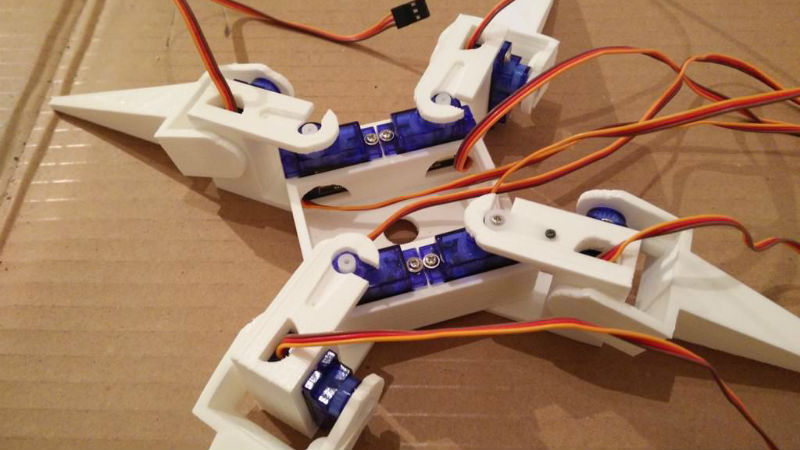
Eyepot is a four-legged robotic “teapot” with a camera, designed to creep people out in the most delightful way. The concept borrows from the Eyepot enemy in Alice: Madness Returns, a teapot-like creature with an eerie central eye. The physical build turns that idea into a real-world robot: a teapot shell mounted on a simple quadruped frame, powered by multiple servos, and guided by a small onboard computer.
The title phrase is also a punny riff on the famous “Look on my works…” line that usually ends in despair. Here, the “despair” is replaced with “mercy,” which feels appropriate when a teapot with legs starts patrolling your desk like it pays rent.
Why a Teapot? The Utah Teapot Easter Egg
If you’ve ever wandered through computer graphics history, you’ve probably met the Utah teapot: a classic test model used in rendering and 3D graphics. It’s the “Hello, World” of 3D objectssimple enough to render, complex enough to show off curves, highlights, shadows, and reflections. Eyepot leans into that tradition by wearing a recognizable teapot form, turning an inside joke of graphics into an outside joke of robotics.
Why This Build Matters (Even If It’s Mildly Haunted)
Eyepot looks like a prank, but it’s secretly a masterclass in practical maker engineering. Builds like this force you to confront the realities of real-world robotics:
- Mechanics: linkages, joints, friction, and alignment
- Electronics: powering servos without browning out your controller
- Control: generating stable gaits with limited degrees of freedom
- Software: splitting tasks between “real-time motion” and “high-level brains”
- Design iteration: 3D printing, testing, adjusting, and printing again
In other words: the teapot is the costume. The engineering is the main character.
Anatomy of a Walking Teapot
The “Two-Brain” Architecture: Small Computer + Microcontroller
Many hobby robots separate responsibilities:
- A microcontroller (great at timing) handles servo pulses and smooth movement.
- A single-board computer (great at higher-level tasks) handles Wi-Fi, camera streaming, user interfaces, and heavier logic.
This approach is popular because servos demand consistent timing. Meanwhile, camera streaming and networking can be “bursty” and unpredictable. Splitting the workload keeps your robot from face-planting because your video feed decided to buffer at the worst possible time.
Eight Servos, Four Legs, Two Degrees of Freedom Per Leg
A common beginner-friendly quadruped layout uses two servos per leg:
- Hip servo: swings the leg forward/back (or slightly outward/inward, depending on design).
- Knee servo: lifts/drops the leg to step.
This setup won’t do ballet. But it will walk in a stable, “mechanical creature” way that’s perfect for the Eyepot vibe. The movement is a little stiff, a little insect-likeand that’s honestly part of the charm.
3D-Printed Frame and Linkages
Eyepot-style builds often use parametric 3D modeling (commonly OpenSCAD) to create parts that can be resized and tweaked by changing a few variables. That’s incredibly useful when you’re dialing in:
- servo horn offsets
- leg length vs. stability
- mount spacing for your electronics
- clearances so nothing binds mid-step
Parametric design shines in robotics because you will make version two. Probably version five. That’s not failureit’s the hobby.
Power: The Fastest Way to Make Yourself “Weep For Mercy”
If Eyepot teaches one lesson loudly, it’s this: servos are hungry. When multiple servos move at once, current demand spikes. If your power setup can’t handle it, you’ll see symptoms like:
- the microcontroller resetting
- the small computer rebooting
- random twitching
- “walking” that looks like a startled crab
A reliable strategy is to power the servos from a dedicated supply (or battery regulator) while powering your logic separatelybut with a common ground. Add decoupling capacitors near the servo power rails to smooth out spikes, and route wiring neatly so you don’t create an accidental antenna farm.
The Eye: Camera Streaming Without Turning Into a Spy Movie
The camera is what makes Eyepot feel alive. Whether you stream video to a browser, capture timelapses, or run simple motion detection, the camera turns a toy robot into something that feels… observant.
Common approaches include:
- Local streaming to a webpage on your home network
- Recording clips when motion is detected
- Low-latency preview for “first-person view” driving (even if your robot isn’t wheeled)
Just remember: cameras create responsibility. We’ll cover that in a later section.
How Eyepot Walks: The Gait You Can Actually Implement
Quadruped walking can get fancy fastkinematics, inverse kinematics, center-of-mass planning. But Eyepot’s charm is that it doesn’t need a PhD gait to be effective. A simple, repeatable gait works beautifully.
A Practical “Creep Walk” Gait
One approachable pattern is a slow, stable sequence where three legs stay planted while one leg moves:
- Lift front-left, move forward, place down
- Lift rear-right, move forward, place down
- Lift front-right, move forward, place down
- Lift rear-left, move forward, place down
This is not the fastest gait, but it’s stable, easy to tune, and looks convincingly “creature-like.” If your robot wobbles, slow down. If it still wobbles, widen the stance slightly or reduce step length. If it still wobbles, congratulations: you’ve discovered why real quadrupeds are hard.
Calibration: The Unsexy Step That Saves the Project
Before you try walking, calibrate each servo so “neutral” is truly neutral. A typical calibration flow looks like this:
- Set each servo to a known neutral pulse/angle.
- Attach horns so the joint sits at a consistent reference angle.
- Measure left vs. right symmetry (don’t trust your eyeballsuse a simple jig or ruler).
- Store per-servo offsets in software so the robot stands evenly.
Most “my robot can’t walk” problems are actually “my robot can’t stand straight” problems.
Build Roadmap: A High-Level Plan That Won’t Melt Your Brain
Step 1: Decide What You’re Copying vs. Inventing
Pick your baseline:
- True Eyepot homage: teapot shell, one “eye,” creepy vibe.
- Practical quadruped: same mechanics, but with a friendlier body (a box, a cat, a tiny sofa).
- Art robot: make the teapot a lantern, a planter, or a moving sculpture.
Step 2: Print and Dry-Fit Everything
Before installing electronics, assemble the body and legs without wiring. Check for:
- binding joints
- servo horn clearance
- leg symmetry
- stable stance
If parts bind, don’t “power through.” Sand, reprint, or adjust the design. Servos will happily try to force a bad jointand they’ll punish your battery (and your patience) for it.
Step 3: Wire Like You’ll Have to Debug Later (Because You Will)
Organize wiring into three zones:
- Servo power bus: thick enough wiring, short runs where possible.
- Logic power: stable supply for your microcontroller and small computer.
- Signals: clean routing, avoid running signal lines parallel to noisy power lines for long distances.
Label connectors. Future-you is a real person with real feelings.
Step 4: Bring It to Life in Phases
- Test each servo individually for full range and smooth motion.
- Test each leg as a pair (hip + knee) with simple up/down and forward/back motions.
- Test standing posture with offsets until the robot is level.
- Test stepping in place (no forward movement) to validate stability.
- Finally, walk with small steps and slow timing.
Make It Yours: Upgrades That Add Brains (Not Just Spook)
Add Simple Sensors
Even basic sensors can make Eyepot feel smarter:
- Motion sensor: wake up and “look” around when someone approaches.
- Distance sensor: avoid table edges (a very practical form of mercy).
- IMU: detect tilt and compensate stance slightly.
Give the Eye Personality
The camera can be purely functional, or it can be theatrical:
- mount it behind a translucent “iris”
- add a subtle LED ring (dim, not blinding)
- program slow “search” pans by turning the whole body slightly
Done right, it becomes less “security device” and more “desktop gremlin with a film degree.”
Responsible Eyepot: Privacy, Consent, and Not Being That Person
A camera robot is fununtil it isn’t. If you stream or record video, follow a few commonsense rules:
- Keep it local whenever possible (home network, not the public internet).
- Tell people when it’s on. Hidden cameras aren’t quirky; they’re a trust breaker.
- Avoid private spaces (bathrooms, bedrooms, changing areasjust don’t).
- Secure access with strong passwords and updated software.
Eyepot should make people laugh, not worry.
Troubleshooting: When You Start Weeping For Mercy
Problem: The Robot Twitches and Resets
- Use a stronger servo power supply.
- Separate servo power from logic power; connect grounds.
- Add decoupling capacitors near the servo rail.
Problem: It “Walks” Like It’s Slipping on a Banana Peel
- Reduce step length.
- Slow down gait timing.
- Check foot traction (rubber pads help).
- Recalibrate neutral positions and offsets.
Problem: One Leg Fights the Others
- Verify servo direction; invert in software if needed.
- Inspect mechanical alignment (one crooked horn can ruin everything).
- Test that leg alone through its full range for binding.
Problem: Camera Lag Makes Control Awkward
- Lower resolution or frame rate.
- Use a simpler local streaming method.
- Keep Wi-Fi strong and reduce network congestion.
Conclusion
“Look Upon Eyepot, And Weep For Mercy” is funny because it’s dramaticyet also weirdly accurate. A camera-eyed teapot on legs has no practical reason to exist… which is exactly why it’s such a great project. Eyepot is a wearable costume for real engineering lessons: power design, servo control, 3D printing iteration, and the art of making something mechanical feel alive.
If you build one (or build your own teapot-adjacent creature), keep it stable, keep it safe, and keep it honest. The goal isn’t to scare people forever. It’s to make them grin, lean in, and say, “Okay… how did you make that?”
Experiences: Living With Eyepot Energy (An Extra )
Even if you never build the exact Eyepot, projects in the “Eyepot spirit” tend to create the same set of memorable momentsbecause anything with legs and a camera instantly becomes a character in your space.
1) The first power-on is always a little theatrical. You place the robot on the table, hit the switch, and watch it do that tiny servo “twitch” as everything initializes. In a normal robot, that twitch is just calibration. In a teapot robot, it looks like the teapot is waking up and choosing mischief. People nearby usually laugh first, then take a cautious half-step backlike it might ask them to solve a riddle to pass.
2) Makerspaces treat it like a celebrity. Bring a walking teapot to a club meetup and you’ll see phones come out immediately. Not because the mechanics are impossiblemany members have built quadrupedsbut because the theme makes it unforgettable. Eyepot is proof that presentation matters: the same hardware dressed as a plain chassis is “a robot.” Dressed as a teapot with an eye, it’s “a story.” People ask about the shell, the camera mount, the print settings, and thenalmost as an afterthoughtthe gait code. The costume draws them in; the engineering keeps them there.
3) Pets and siblings react in surprisingly different ways. A cautious cat may observe from a safe distance, tracking the motion like it’s watching a slow-moving mechanical insect. A bold dog might approach immediately, then recoil when the robot stepsbecause stepping is not supposed to be a thing teapots do. Meanwhile, younger siblings (or your friend’s little cousin) often get over the “creepy” part quickly and jump straight to naming it. Once something has a name, it’s no longer scary; it’s a household gremlin. That’s the magical line where your project turns from “what is that?” into “where’s Eyepot?”
4) The camera changes the whole vibe. Without the camera, it’s a fun walker. With the camera, it feels like it’s paying attentioneven when it’s not. People wave at it. They lean in to see if the feed is live. They ask what it records. This is where responsible design becomes part of the experience: a visible indicator light, clear rules about when it’s on, and local-only streaming can keep the mood playful instead of uneasy. The best “Eyepot experiences” are the ones where everyone is laughing, not wondering.
5) Every build ends with tiny rituals. You’ll probably develop a routine: set it down carefully, run a quick “stand straight” command, test one step, then let it walk. You’ll keep a small screwdriver nearby because one horn will loosen at the worst time. You’ll reprint a bracket because the camera angle is slightly off. And someday, you’ll realize you’re not just maintaining a robotyou’re maintaining a character. That’s the real reward of Eyepot-style projects: they don’t just move. They belong.