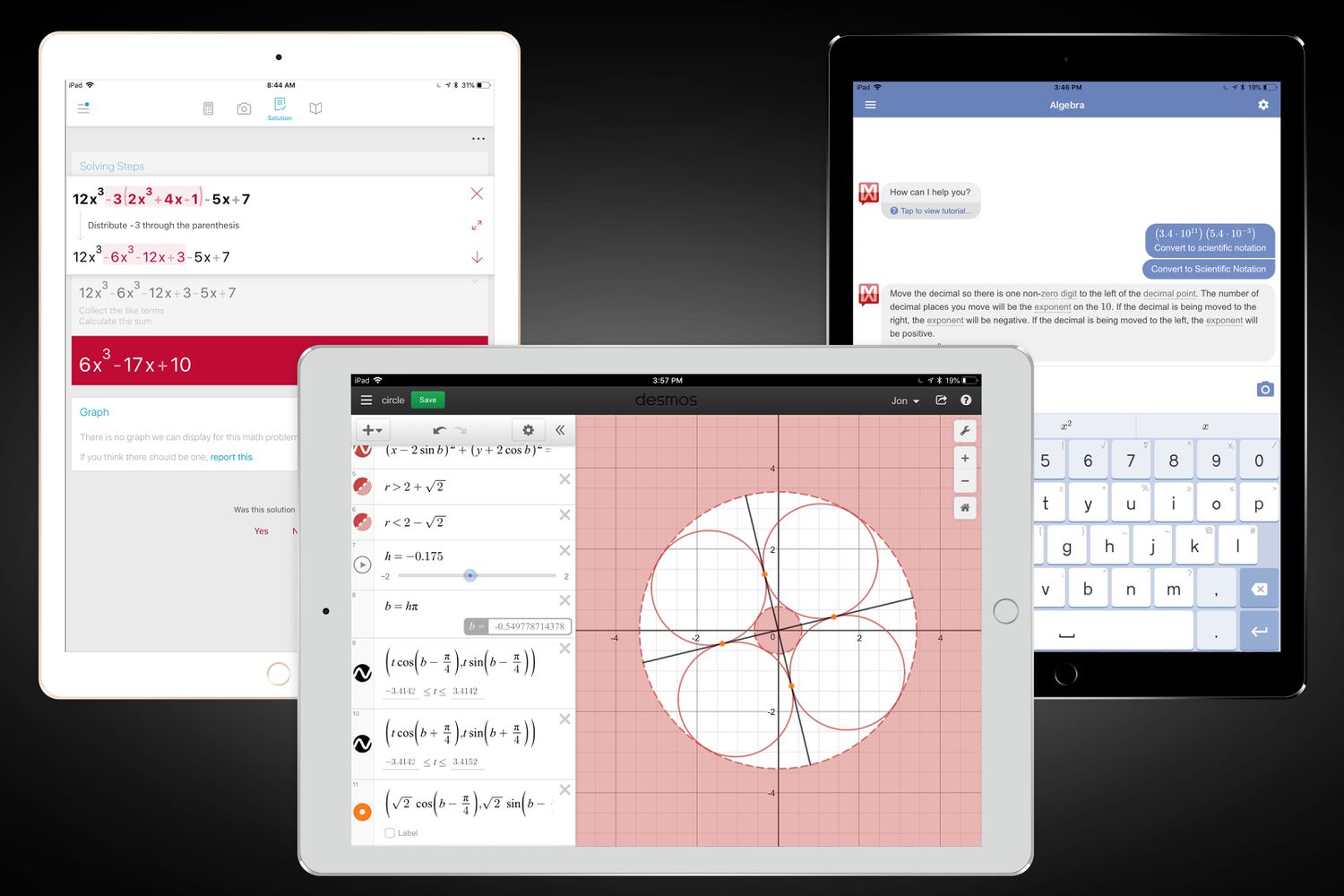
Somewhere between “What’s 18% tip?” and “Please graph this monstrosity of an equation,”
most of us realize the default phone calculator isn’t quite enough. The good news: modern
calculator apps are wildly more powerful (and a lot prettier) than the clunky
plastic bricks we used in high school.
From simple everyday math to full-on calculus and graphing, there’s an app tuned to how
your brain works. We combed through app stores, user reviews, and expert recommendations
to pick seven calculator apps we’d happily keep on our home screens.
Some shine at graphing, others at unit conversion, and a few basically become your
personal math tutor.
Below, you’ll find our favorite calculator apps, why we like them, and who each one is
best forplus some real-world experiences from using them daily. Let’s crunch some numbers.
How to Choose a Calculator App (Without Overthinking It)
Before we get into individual picks, it helps to know what you actually need from a
calculator app. A quick checklist:
- Type of math: Just tip-splitting and discounts, or also algebra, calculus, and statistics?
- Platform: iOS, Android, iPad, desktop, or browser-based?
- Interface style: Traditional keypad, graphing view, or handwriting recognition?
- Extras: History tape, unit and currency conversion, equation solving, or step-by-step explanations?
- Price: Many of the best calculator apps are free or low-cost; a few charge for pro features.
With that in mind, here are the seven calculator apps that consistently impressed us for
usability, features, and overall “wow, this is way better than the stock calculator” factor.
1. Google Calculator – Clean, Free, and Surprisingly Capable
If you’re on Android, there’s a good chance you already have this one. Google’s own
Calculator app delivers a clean design and a mix of basic and scientific
functions without any fluff. It covers everyday arithmetic as well as trigonometric,
logarithmic, and exponential functions in a simple, two-row layout.
Best for
Android users who want a reliable, no-nonsense scientific calculator app
with zero learning curve.
Standout features
- Basic and scientific modes in one interface
- Works great in portrait or landscape
- History and memory functions on many devices
- Free, with no in-your-face ads from Google itself
It’s not flashy and doesn’t try to teach you math, but as an everyday calculator, it’s
hard to beat. For a lot of people, this plus a good graphing app is the perfect combo.
2. All-In-One Calculator – The Swiss Army Knife of Everyday Math
Need to convert currencies, calculate a mortgage payment, and figure out the volume of
a cylinder… all before your coffee gets cold? All-In-One Calculator is
built for that. This app bundles a standard and scientific calculator with a dense
toolkit of converters and specialized calculators for finance, geometry, health, and more.
Best for
People who constantly look up “X to Y converter” in Googlehome cooks, DIYers, students,
and anyone juggling measurements and money.
Standout features
- Dozens of calculators: percentages, discounts, loans, areas, volumes, and more
- Built-in unit and currency converter with lots of categories
- Clean, modern design that doesn’t feel like a spreadsheet from 1999
- Ideal for “real life math” instead of only textbook problems
If you’ve ever tried to manually convert cups to grams, or inches to centimeters while
building furniture, this app will feel like cheatingin the best way.
3. Desmos Graphing Calculator – For Visual Thinkers and STEM Students
When you need to graph functions instead of just crunch numbers, few
tools are as beloved as Desmos. Available as a mobile app and a free
browser tool, Desmos lets you instantly plot lines, parabolas, derivatives, and even
Fourier series.
Best for
High school and college students, teachers, and anyone who understands math better when
they can see it.
Standout features
- Plot polar, parametric, and Cartesian graphs with ease
- Add sliders to see how changing a parameter affects the graph in real time
- Create tables of values and visualize data
- Powerful enough for precalculus, calculus, and statistics
- Free, with a huge educational ecosystem built around it
Desmos has become a staple in classrooms and standardized tests in the U.S.,
especially now that it’s being integrated into many digital exam platforms. If graph
paper gives you flashbacks, Desmos might help rewrite that story.
4. PCalc – The Pro-Grade Scientific Calculator for Apple Fans
If you live in the Apple ecosystem and do serious math, PCalc is the
gold standard. Originally launched decades ago and continuously updated, PCalc is a
fully-featured scientific calculator packed with advanced functions, unit conversions,
and a highly customizable layout.
Best for
Engineers, programmers, scientists, and power users who want a calculator they can
tailor to their exact workflow.
Standout features
- Optional RPN (Reverse Polish Notation) mode and multi-line display
- Extensive set of unit conversions and physical constants
- Undo/redo, paper tape, and different button layouts
- Available on iPhone, iPad, Mac, Apple Watch, and even Apple Vision Pro
PCalc isn’t free, but you’re paying for polish and longevity. It’s a workhorse tool
that feels right at home next to pro apps like Xcode, Matlab, or your preferred IDE.
5. MyScript Calculator 2 – Just Write the Math With Your Finger
Tapping tiny keys isn’t for everyone. MyScript Calculator 2 takes a
different approach: you literally write your equations on the screen as if it were
paper, and the app instantly interprets and calculates them.
Best for
Visual and tactile learners, tablet users with a stylus, and anyone who hates on-screen
keypads.
Standout features
- Real-time handwriting recognition for numbers, operators, fractions, and more
- Scratch-to-erase gestures for quick corrections
- Support for a wide range of operations, from basic arithmetic to more advanced math
- Available on both iOS and Android devices
The magic here isn’t just convenience; it mirrors how many of us naturally set up
problems on paper. That intuitive flow makes it especially appealing for students doing
homework or professionals jotting down quick calculations during meetings.
6. Photomath – The “Show Your Work” Calculator for Homework
If traditional calculator apps answer the question “What’s the result?”,
Photomath asks a more important one: “How do we get there?” This app
lets you scan a printed or handwritten math problem with your phone’s camera and then
walks you through step-by-step solutions.
Best for
Middle-school to college students, parents helping with homework, and anyone relearning
math after a long break.
Standout features
- Scan problems from textbooks, worksheets, or notes
- Step-by-step explanations using teacher-approved methods
- Covers everything from basic arithmetic to calculus and some geometry
- Free core features, with a premium tier for deeper explanations
Used responsibly, Photomath is less of a “cheat app” and more like having a patient tutor
available 24/7. It’s especially useful for checking your work and understanding where you
went wrong.
7. Calculator Plus – Simple Everyday Math With History
Not everyone needs graphing or step-by-step derivations. Sometimes you just want a
straightforward calculator that remembers what you did five minutes ago.
Calculator Plus fits that niche beautifully, offering a clean interface,
big buttons, and a built-in calculation history.
Best for
Everyday users who mostly handle tips, discounts, budgets, and basic calculationsbut
still want a little more convenience than the stock app.
Standout features
- Large, easy-to-read display and buttons
- Scroll-back history so you can double-check previous results
- Ideal for shopping, splitting bills, and quick ratio calculations
- Free on Android, with a design that favors usability over complexity
If you frequently find yourself saying, “Wait, what was that number again?” this app
pays for itself in sanity alone.
Quick Comparison of Our 7 Favorite Calculator Apps
| App | Best For | Core Strength | Platforms |
|---|---|---|---|
| Google Calculator | Everyday Android users | Simple + scientific functions | Android |
| All-In-One Calculator | Real-life conversions and finance | Multi-calculator & unit converter | Android, iOS |
| Desmos | Students & educators | Graphing and visualization | iOS, Android, Web |
| PCalc | Engineers & power users | Advanced scientific & customization | iOS, macOS, watchOS |
| MyScript Calculator 2 | Stylus & handwriting fans | Handwriting recognition | iOS, Android |
| Photomath | Learning & homework help | Step-by-step explanations | iOS, Android |
| Calculator Plus | Everyday basic math | Simple UI + history | Android |
Which Calculator App Should You Download First?
If you aren’t sure where to start, here’s a quick set of recommendations:
- Just need a better basic calculator? Try Google Calculator (Android) or Calculator Plus.
- Constantly converting stuff? All-In-One Calculator will save you a ton of time.
- In algebra, calculus, or physics classes? Pair Desmos with Photomath so you can visualize and understand problems.
- Doing professional or engineering work on Apple devices? PCalc is worth the investment.
- Love writing instead of typing? MyScript Calculator 2 will feel natural immediately.
You don’t need to pick just one. Many people use a basic calculator for quick math, a
graphing calculator for functions, and a learning-focused app like Photomath for tough
homework problems. Storage is cheap; confusion is expensive.
Real-World Experiences With Our Favorite Calculator Apps
After living with these calculator apps in everyday situations, a few
patterns stand outand they may help you decide which ones deserve a permanent spot on
your home screen.
For everyday life, All-In-One Calculator quietly became the unsung hero. Cooking dinner?
Its measurement conversions made it painless to double a recipe written in grams when
your measuring cups only show ounces. Planning a road trip? The app quickly converted
kilometers to miles, and liters to gallons, without you needing to open a browser tab
or sift through search results. It’s the kind of app you forget about until you suddenly
realize you use it three times a day.
Desmos, on the other hand, has a very different energy. It shines when the math gets
abstract. Trying to understand what happens to a parabola when you change the coefficient
in front of x²? Drag a slider, watch the graph stretch or compress, and suddenly
that algebra lecture makes a lot more sense. This visual feedback is especially helpful
for students who struggle when math stays stuck in symbolic form. Teachers appreciate
that they can project Desmos or assign interactive activities, while students can repeat
the same explorations at home on their phones or laptops.
PCalc makes its case the moment you dive into more technical work. Picture an engineer
calculating load, switching between units, and using hexadecimal or binary representations
while writing embedded code. Here, a polished, fully customizable calculator feels less
like an app and more like a professional instrument. The unit conversion library alone
saves a surprising amount of time when you’re deep in a problem and don’t want to
constantly look up conversion factors.
For students, Photomath is often the difference between staring at a problem in defeat
and actually learning from it. We found it especially useful in two scenarios: reviewing
for exams and helping younger family members with homework. Instead of just telling a
student the answer, you can walk through Photomath’s step-by-step solution and talk
about why each step works. Used this way, the app reinforces understanding rather than
encouraging shortcuts.
MyScript Calculator 2 is the one that surprised people the most. Handwriting an equation
and watching it resolve in real time feels futuristic, but its biggest strength is how
natural it becomes. It’s great during brainstorming sessions or when you’re sketching
ideas in a digital notebook and want to keep your workflow fluid. You don’t have to
mentally switch to “calculator mode”you just keep writing.
Finally, Google Calculator and Calculator Plus remain the quiet workhorses. They handle
tip splits at restaurants, quick discount checks during sales, and daily budgeting tasks.
Their history features are more useful than they first appearbeing able to scroll back
through a long string of calculations often saves you from having to redo everything
when one number changes.
The biggest takeaway from using all these tools? There’s no single “best” calculator app
for everyone. Instead, each excels in a specific contextlearning, visualizing, converting,
or doing hardcore engineering work. Building your own small toolkit of two or three apps
tailored to your life is far more powerful than insisting that one app has to do it all.
We’re long past the era where a calculator is just a digital version of a plastic device.
Today’s calculator apps teach, visualize, and organize your math in ways
that can genuinely reduce stress. Once you match the right app to the right task, a lot
of previously frustrating math suddenly feels manageableand sometimes even fun.
Final Thoughts
Whether you’re calculating a restaurant tip, graphing a tricky function, or decoding your
kid’s calculus homework, there’s a calculator app designed to make that moment easier.
Our seven favorites cover the full spectrumfrom minimalist everyday math to deep
graphing and step-by-step learning support.
The trick is to treat your calculator apps like tools in a toolbox, not a single
do-everything gadget. Install a couple that match your real-world needs, keep them
handy, and let them take the mental load off your plate. You’ll make fewer mistakes,
understand the math better, and maybe even start to enjoy crunching numbers.