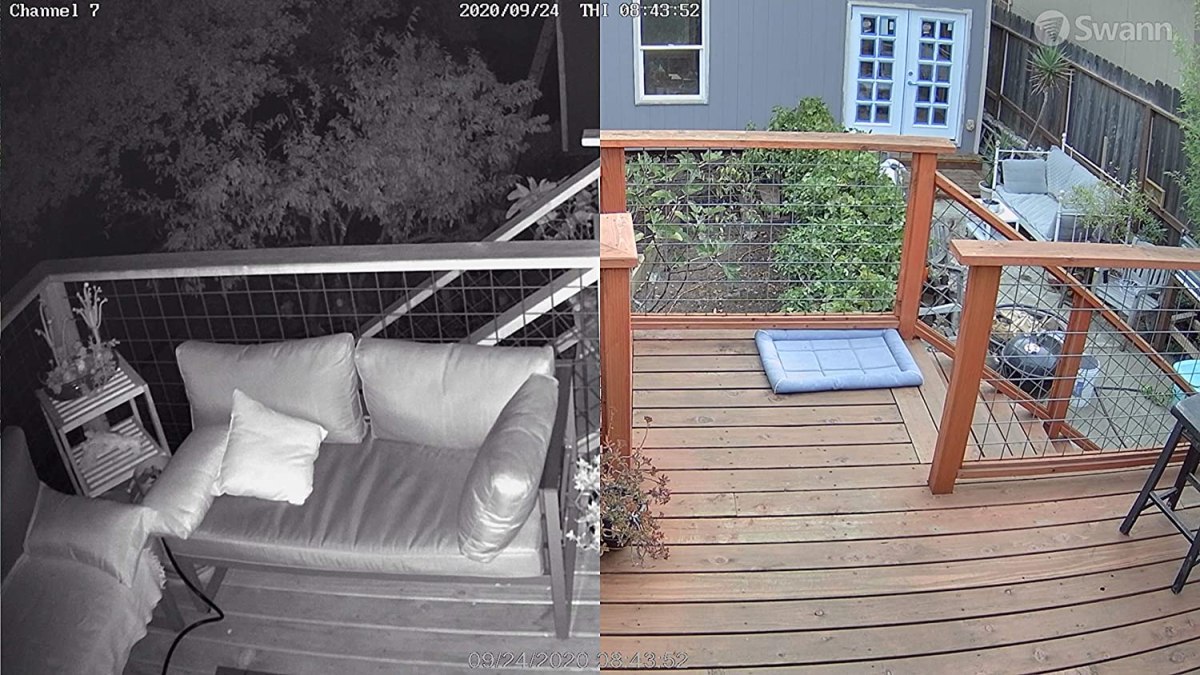
If you’re tired of getting motion alerts every time a moth sneezes near your porch lightor you’ve watched one too many grainy crime clips on the evening newsthen it’s probably time to upgrade to a PoE security camera system.
Inspired by the rigorous testing and hands-on evaluations behind Bob Vila–style product reviews, this guide walks you through the best PoE security camera systems, what to look for, and how to choose the right setup for your home or small business.
We’ll cover top PoE kits from trusted brands like Reolink, Amcrest, Lorex, Swann, and Eufy, explain how PoE compares with Wi-Fi cameras, and share real-world lessons from homeowners who’ve actually lived with these systemscable runs, NVR noise, false alerts and all.
What Is a PoE Security Camera System, Exactly?
PoE stands for Power over Ethernet. Instead of using one cable for power and another for data, a PoE security camera uses a single Ethernet cable (usually Cat5e or Cat6) to carry both power and video/network data between the camera and the network video recorder (NVR) or PoE switch.
In a full PoE security camera system, you typically get:
- Several wired IP cameras (often 4–8 out of the box).
- An NVR with a built-in hard drive for local recording.
- PoE ports on the NVR or a separate PoE switch for power + data.
- A mobile/desktop app for live view, playback, and notifications.
The result? A clean, hardwired setup that doesn’t rely on Wi-Fi for each camera’s connection and doesn’t require separate power outlets at every mounting point.
PoE vs. Wi-Fi vs. Battery Cameras
Before you commit to a PoE kit, it helps to understand how it stacks up against other popular options.
PoE Cameras
- Best for: Long-term, “set it and forget it” installations; whole-home and small-business coverage.
- Pros: Reliable wired connection, no Wi-Fi interference, single-cable power and data, strong 4K options, scalable using more PoE ports.
- Cons: Requires planning and running Ethernet cable; installation can take time if your walls or ceilings are finished.
Wi-Fi Cameras
- Best for: Renters, small apartments, or spots where pulling cable is nearly impossible.
- Pros: Easier to place, no Ethernet cabling required, quick to install.
- Cons: Vulnerable to Wi-Fi drops, bandwidth issues, and signal dead zones; you may need repeaters or mesh networking.
Battery or Solar Cameras
- Best for: Areas with no power or network nearby, temporary setups.
- Pros: Completely wire-free; flexible placement; great for sheds, gates, or driveways far from the house.
- Cons: Lower bitrates, battery maintenance, and potential gaps if batteries die or solar isn’t sufficient.
If you’re planning a permanent system and don’t mind pulling cable once to get it right, PoE is usually the most robust, professional-level option.
Key Features to Look For in the Best PoE Camera Systems
1. Resolution and Image Quality
Modern PoE systems frequently offer 4K (8MP) resolution, with budget-friendly 5MP options still delivering excellent clarity. Higher resolution makes it easier to read license plates, identify faces, and zoom in on recorded footage without everything turning into a pixelated blob.
2. Channels and Included Cameras
PoE NVRs are often sold with 8 or 16 channels. Even if you only need four cameras today, choosing an NVR with extra channels lets you add more cameras later for side yards, garages, and outbuildings. Starter kits like Reolink’s popular 8-channel NVR with four 4K cameras give you an upgrade path out of the box.
3. Local Storage and Expandability
Look for an NVR with:
- A preinstalled hard drive (2TB–4TB is common for home use).
- Support for higher-capacity or additional drives if you want weeks of 24/7 recording.
- Options for motion-only recording to save space.
Many homeowners find 2TB enough for four 4K cameras recording on motion only; if you’re adding more cameras, switching to 24/7 recording, or running a small business, plan on upgrading to a larger drive or adding a second one.
4. Smart Detection and Notifications
The best systems now include AI-driven detection that distinguishes people and vehicles from leaves, bugs, or shifting shadows. This reduces notification spam and helps you focus on important events. Some kits offer additional features like face detection, two-way audio, or pet and package alerts.
5. Night Vision and Weatherproofing
Outdoor PoE cameras should be at least IP66 or IP67 weather-rated, meaning they can handle dust, rain, and temperature swings. For night performance, look for:
- Infrared night vision rated to around 90–100 feet.
- Optional color night vision using integrated spotlights.
- Wide viewing angles (100–130 degrees) to reduce blind spots.
6. App Experience and Smart Home Integrations
A smooth, intuitive app makes or breaks the experience. Good apps offer easy remote viewing, timeline scrubbing, smart search (by person, vehicle, or area), and secure remote access. Some systems integrate with platforms like Amazon Alexa, Google Assistant, Apple Home, or local NAS storage, adding flexibility for power users.
Top PoE Security Camera Systems – Inspired by Bob Vila’s Picks
Home-improvement reviewers like Bob Vila’s team test and compare a range of PoE security systems, weighing camera quality, installation, and value. Below are standout system types that reflect the strengths of those picks, paired with what similar expert and consumer reviews say about them.
1. Reolink 4K PoE Kits (RLK8-810B4-A / RLK8-800B4): Best Overall for Most Homes
Reolink’s 4K PoE starter kits hit a sweet spot of price, performance, and ease of use. A typical bundle includes:
- Four 4K bullet or dome cameras with human/vehicle detection.
- An 8-channel NVR with about 2TB of storage, often expandable up to 12TB.
- Weatherproof IP67 housings for indoor or outdoor mounting.
- Night vision up to about 100 feet plus audio recording.
These kits are ideal if you want a plug-and-play system that still allows for plenty of tweaking (custom motion zones, record schedules, and smart search in the app) without needing to be a network engineer.
2. Amcrest ProHD Turret PoE: Best Budget Upgrade Camera
If you already have an NVR or prefer to build your own system piece by piece, Amcrest’s 5MP PoE turret cameras are popular “bang-for-your-buck” picks. They typically offer:
- Sharp 5MP video with a wide field of view.
- Solid IP67 weather resistance for outdoor use.
- Support for local microSD storage plus NVR or cloud options.
On their own, these cameras don’t give you a full kit, but they’re an excellent way to expand an existing PoE system or upgrade older lower-resolution cameras without paying high-end prices.
3. Amcrest UltraHD 4K Dome PoE: Best for Tamper-Prone Spots
Dome-style PoE cameras, including Amcrest’s 4K UltraHD domes, shine where you’re worried someone might try to tamper with or redirect the camera. Their low-profile, vandal-resistant housings, wide viewing angles, and strong night vision make them ideal for:
- Front porches and entryways.
- Low soffit areas near doors or garages.
- Indoor commercial spaces like lobbies or hallways.
4. Hiseeu 4K PoE Security Camera System: Best Value with Two-Way Audio
Hiseeu’s PoE kits often bundle four 5MP cameras with an NVR that includes a generous hard drive and two-way audio. Two-way audio lets you talk through the camera using your phoneperfect for greeting guests, instructing delivery drivers, or giving potential intruders a very firm “you are being recorded” announcement.
5. Reolink RLK8-520D4 5MP: Best for Smart Motion Detection
This Reolink variant offers 5MP dome cameras with strong night vision and refined person/vehicle detection. Many homeowners like this combination when they want:
- More advanced motion filtering to cut down false alerts.
- Good detail with smaller file sizes than full 4K.
- Quiet operation from a compact NVR.
6. Lorex 4K PoE Systems: Feature-Rich 4K Powerhouses
Lorex remains a favorite in many PoE camera roundups thanks to its robust 4K kits. Common highlights include:
- High-resolution 4K cameras with HDR for better contrast.
- Color night vision when ambient light or built-in lights are available.
- Weatherproof metal housings designed for harsh outdoor environments.
Lorex is especially attractive if you have a large property or want a brand that’s widely available at big-box stores and major online retailers.
7. Eufy PoE NVR Systems (e.g., S4 Max): Local-First, Smart-Home Friendly
Eufy’s NVR-based PoE systems extend the company’s “no mandatory subscription” philosophy to wired cameras. Key appeals:
- Local storage on the NVR helps you avoid monthly cloud fees.
- Smart detection features like person and package recognition in some models.
- Integration with mainstream smart ecosystems and flexible app control.
They’re a strong choice if you like polished apps and want to prioritize local recording with cloud options as backup rather than as your only storage choice.
8. Swann 4K NVR Kits: Great for Larger, Multi-Camera Installs
Swann’s multi-camera NVR kits often come with eight or more 4K cameras plus a roomy hard drive, making them well suited to:
- Larger homes with numerous entry points.
- Small businesses needing high camera counts.
- Users who want robust features like heat-based detection on select models.
If you know you’ll eventually need a lot of cameras, starting with a Swann 8-channel or 16-channel NVR can help avoid outgrowing your system too quickly.
Comparison Snapshot: System Types and Strengths
| System Type | Typical Resolution | Included Cameras | Storage | Best For |
|---|---|---|---|---|
| Reolink 4K PoE Kit | 4K (8MP) | 4 (expandable to 8) | ≈2TB, expandable | Most single-family homes |
| Amcrest Turret/Dome | 5MP–4K | Single cams, add as needed | NVR or microSD, optional cloud | Custom or DIY multi-brand builds |
| Hiseeu 5MP PoE Kit | 5MP | 4 (expandable) | ≈3TB NVR | Budget users needing two-way audio |
| Lorex 4K NVR Kits | 4K (8MP) | 4–8+ | 2–4TB, often expandable | Large homes and demanding users |
| Eufy PoE Systems | Varies by model (2K–4K) | Usually 2–4 | Local NVR, optional cloud/NAS | Local-storage fans, smart-home users |
How to Choose the Right PoE System for Your Space
1. Map Your Property
Start by sketching a simple map of your home or business. Mark doors, driveways, sidewalks, alleyways, and any “high-value” areas like garages or sheds. This helps you determine how many cameras you actually need and where they should go to avoid blind spots.
2. Decide on 4K vs. 5MP
If budget allows, go for 4K at least for your most critical zones (front door, driveway, street-facing areas). You could mix 4K cameras for key zones and 5MP cameras for secondary coverage to balance cost and storage.
3. Consider Future Expansion
Even if you only install four cameras today, choosing an 8-channel NVR gives you room to grow. Think about where you might add cameras in the futurebackyard, side yards, interior entrywaysand plan your cable routing accordingly.
4. Check Your Network and Remote Access Needs
PoE cameras themselves don’t crush your Wi-Fi, but the NVR still needs a stable network connection for remote viewing. Make sure your router is reasonably up to date and that you’re comfortable setting up secure remote access (or using the vendor’s app-based setup).
Installation Tips for PoE Security Camera Systems
PoE systems are surprisingly DIY-friendly if you’re comfortable drilling a few holes and fishing cables. A few guidelines can make the process much smoother:
- Use quality Ethernet cable: Cat5e is often enough; Cat6 gives extra headroom and durability.
- Run cables with slack: Leave a bit of extra length at each camera and at the NVR so you’re not fighting tight connections.
- Test before you mount: Plug all cameras into the NVR on a table first to confirm they power up and stream video correctly.
- Think about NVR placement: Store it somewhere relatively cool, secure, and not right next to your bedroom (NVR drives can hum).
- Fine-tune motion zones afterward: Once everything is mounted, adjust detection zones and sensitivity to avoid alerts from passing cars or swaying trees.
Common Mistakes to Avoid
- Mounting too high: Super-high camera placements give a nice overview, but you lose facial detail. Aim for about 8–10 feet high for door and driveway cameras.
- Ignoring lighting: Position cameras to avoid direct glare from sun or headlights. If necessary, add a small floodlight for better nighttime footage.
- Underestimating storage: Four 4K cameras recording 24/7 can fill a 2TB drive quickly. Use motion-based recording or upgrade the drive if you need longer history.
- Skipping labels: Label each cable at both ends. Future-you will be very grateful when troubleshooting.
- Not securing remote access: Always use strong passwords, enable two-factor authentication if available, and avoid exposing the NVR’s web interface directly to the internet without proper security.
Final Verdict: Which PoE System Should You Buy?
If you want a straightforward recommendation that aligns with Bob Vila–style testing and common expert picks, a Reolink 4K PoE kit is often the best starting point for most homeowners. It gives you crisp 4K video, reliable PoE power, smart detection, and a reasonably quiet NVR at a fair price. From there, you can layer in more specialized camerasAmcrest domes for tamper-prone areas, Lorex or Swann kits for larger properties, or Eufy NVR systems if avoiding subscriptions is a priority.
The good news: once you’ve done the one-time work of running Ethernet and placing cameras thoughtfully, a PoE system tends to fade into the background, quietly capturing the footage you hope you’ll never needbut will be very glad to have if you do.
Real-World Experiences with PoE Security Camera Systems
On paper, PoE cameras sound great. In practice, most homeowners’ experiences boil down to a few recurring themesmany of them reassuring, some of them cautionary.
“I Was Intimidated… Until I Actually Started”
A common story from DIYers is that they procrastinated for weeks, staring at the box, convinced the install would be a nightmare. Once they actually started running cable, they realized it was time-consuming but not complicated. Drill a hole, feed the Ethernet cable, crimp or attach connectors if needed, plug into the NVR, and watch the camera spring to life. The most tedious part is crawling in attics and fishing cables through tight spaces, not the tech itself.
False Alerts vs. Smart Detection
People switching from older motion-only systems to newer PoE kits with person and vehicle detection often describe it as a game-changer. Instead of dozens or hundreds of daily alerts from insects, wind, or headlights, they get a handful of meaningful notificationslike someone walking up the driveway or a car pulling into the lot.
That said, smart detection isn’t magic. In busy street-facing locations, you’ll still need to fine-tune motion zones and sensitivity. Many users end up carving out “ignore zones” for sidewalks or roadways while focusing alerts on the porch, driveway, or backyard gate.
Cable Quality and Weather Reality Checks
Real-world conditions are tougher than spec sheets. Homeowners in hot, humid, or very cold climates report that cheap Ethernet cables and poorly sealed junction boxes cause the most headaches over time. Spending a bit more on UV-resistant outdoor-rated cable, sealing wall penetrations, and using junction boxes or conduits where necessary dramatically improves reliability.
NVR Noise, Heat, and Placement
Another recurring lesson: don’t put the NVR on your nightstand. Hard drives spin, tiny fans whir, and the unit can get warm under heavy use. Most people end up placing the NVR in:
- A networking closet or utility room.
- An office or shelving unit away from bedrooms.
- A locked cabinet or secure area if they’re worried about someone stealing the recorder.
Just remember to give it some ventilationstuffing an NVR in a fully closed, unventilated cabinet is a recipe for overheating and early drive failure.
Remote Viewing Peace of Mind
Once the system is dialed in, the biggest benefit owners talk about isn’t just catching porch piratesit’s peace of mind. Being able to:
- Check whether a package actually arrived where the courier says it did.
- Confirm that kids got home from school and made it inside.
- See whether a noise in the night was a raccoon, neighbor’s cat, or something more serious.
Over time, many users stop staring at live feeds and instead rely on recordings and alerts as needed. The cameras become part of the home’s invisible infrastructure, like locks and smoke detectorsquiet, reliable, and there when you need them.
Upgrading and Expanding Over Time
Because PoE is an open, Ethernet-based standard, expanding your system tends to be easier than replacing it. Homeowners commonly start with a four-camera, 8-channel kit and then add:
- A dome camera near the front door for tamper resistance.
- A long-range bullet camera covering a driveway or alley.
- An interior camera in a garage or workshop.
When storage inevitably becomes tight, they pop in a larger hard drive or add a second one, rather than tossing the whole system. That’s the long-term appeal of a wired PoE setup: it’s not just a gadget; it’s an upgradable part of your home’s security backbone.
SEO Meta Data in JSON Format