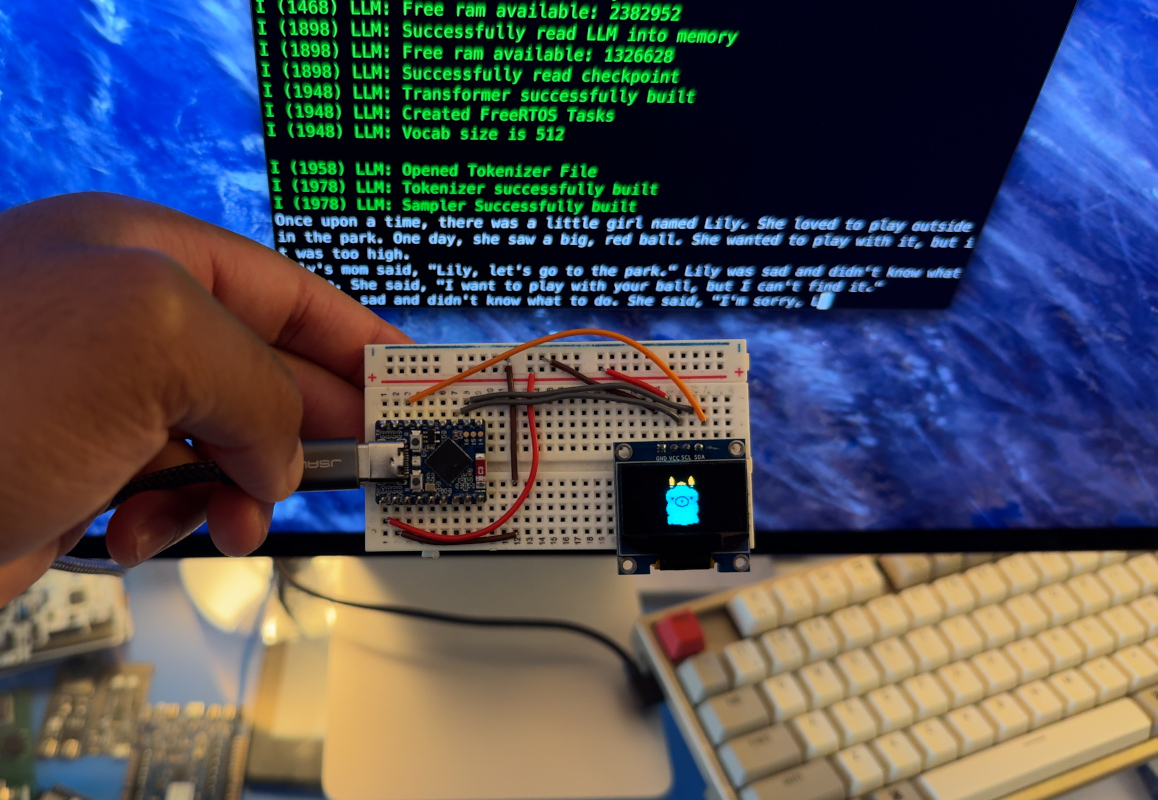
For years, large language models had the same vibe as a celebrity rider sheet: expensive, demanding, and somehow always asking for more GPUs. If you wanted serious AI, you were expected to bow respectfully toward the cloud and pray your credit card survived the encounter. That picture has changed fast. Today, local AI is no longer a science-fair experiment for people who own three keyboards and call their basement a lab. Large language models on small computers are becoming practical for developers, students, businesses, and curious tinkerers who want speed, privacy, and control without renting a tiny section of a data center.
The big shift is not magic. It is engineering. Models have become more efficient, runtimes have become smarter, and hardware has become much better at handling inference close to the user. The result is simple but powerful: you can now run useful LLM workloads on laptops, mini PCs, AI PCs, and even phones. No, your old toaster still cannot host a frontier model, although the internet would absolutely try.
Why This Topic Matters Right Now
The phrase large language models on small computers sounds almost contradictory. “Large” suggests giant infrastructure. “Small computer” suggests a laptop balancing on a coffee table next to a half-finished sandwich. But the market has moved toward a more practical truth: not every AI task needs a massive model, and not every user wants to send everything to the cloud.
That matters for several reasons. First, local AI can keep sensitive data on the device, which is a big deal for companies, schools, and professionals who would rather not upload internal notes, code, contracts, or customer records to somebody else’s server. Second, local inference can reduce latency. A nearby model often feels faster because it does not need to travel across the internet, wait in line, and come back with an answer wearing cloud-shaped baggage. Third, offline use is increasingly valuable. A model that still works on a plane, in a spotty hotel, or in a factory with restricted connectivity is more than a party trick. It is useful infrastructure.
What Counts as a “Small Computer” in 2026?
In this context, a small computer does not necessarily mean tiny in physical size. It means modest compared with the heavyweight systems usually associated with AI. That includes everyday laptops, thin-and-light notebooks, MacBooks with Apple silicon, Windows AI PCs with NPUs, mini desktops, compact workstations, and some newer mobile devices.
On the low end, you have machines that can comfortably run compact models for summarization, drafting, note cleanup, lightweight coding help, or local retrieval over a personal document set. In the middle, you have laptops and mini PCs with strong CPUs, integrated GPUs, unified memory, or NPUs that can handle much more impressive local AI tasks. And on the higher end, you now have surprisingly small desktops that can run quantized versions of larger models that once sounded wildly unrealistic outside a server rack.
This is why the question is no longer, “Can I run an LLM locally?” The better question is, “Which model and runtime make sense for the machine I already have?” That is a much healthier question, both technically and emotionally.
How LLMs Fit on Smaller Machines
1. Smaller Models Do More Than They Used To
One of the biggest changes is the rise of small language models and efficient open models. Families like Phi, Gemma, and lightweight Llama variants have pushed hard on the quality-per-parameter tradeoff. In plain English, that means the industry has gotten much better at squeezing useful intelligence into smaller packages.
Instead of assuming you need a monster model for every task, developers now choose models that match the job. Need local summarization, classification, retrieval, email drafting, or narrow assistant behavior? A smaller model may be enough. Need deep reasoning across long documents, complex agent orchestration, or demanding coding tasks? Then you scale up, but even that scale-up is increasingly manageable on personal hardware.
This is the quiet revolution behind local AI. Bigger models still matter, but better fit matters more.
2. Quantization Shrinks the Bill
Quantization is one of the main reasons local LLM use has become practical. It reduces the memory footprint of a model by storing weights in lower precision. The model becomes lighter, often much lighter, which makes it easier to run on consumer hardware. There can be tradeoffs in quality, but for many real-world tasks, the trade is worth it.
Think of quantization as vacuum-packing a bulky winter coat so it fits in your carry-on. The coat is still a coat. It just stops acting like it personally owns the overhead bin. That is why many local model users choose 4-bit or similarly compressed variants. The goal is not academic purity. The goal is getting the model to run well enough, fast enough, on the machine you actually own.
3. Better Runtimes Changed the Game
Tools such as llama.cpp, Ollama, LM Studio, MLX, OpenVINO-based stacks, and vendor-specific AI PC frameworks have done a lot of heavy lifting. These runtimes make it easier to download, load, optimize, and serve models locally. They also help users spread work across CPU, GPU, and other accelerators more intelligently.
That matters because raw model weights are only part of the story. A good runtime can make a machine feel much more capable. It handles memory, device selection, quantized formats, local APIs, and other performance details that used to require a heroic number of terminal commands and a mild tolerance for chaos.
4. Hardware Finally Showed Up to the Meeting
Modern local AI depends on better hardware paths. Apple silicon benefits from unified memory and frameworks tuned for that architecture. Windows AI PCs increasingly rely on combinations of CPU, GPU, and NPU. Intel, AMD, NVIDIA, and Qualcomm have all been pushing toolchains and hardware features aimed at on-device AI. In other words, the chips have stopped pretending AI is someone else’s problem.
NPUs are especially important because they help offload certain AI workloads efficiently, improving responsiveness and power use. GPUs still matter for many local model tasks, but the arrival of capable on-device AI hardware means smaller systems are no longer trying to do everything the hard way.
Best Use Cases for Local LLMs
Not every task belongs on a local model, but many do. Local LLMs shine when privacy, responsiveness, cost control, or offline access matter more than absolute benchmark supremacy.
A student might use a local model to summarize readings, create study guides, or rewrite rough notes into cleaner outlines. A developer might run a coding assistant locally for boilerplate generation, documentation cleanup, or quick code explanations. A small business could use one for internal knowledge search, customer response drafting, meeting summaries, or document classification. A traveler might use a local model on a laptop or phone with no reliable internet. A regulated team might prefer a local-first workflow because the safest data leak is the one that never leaves the device.
Local models also pair well with local retrieval. Add a lightweight embedding model and a small document index, and suddenly your machine can answer questions over your own notes, PDFs, manuals, or codebase without sending any of it to the cloud. That is a very practical superpower.
Where Local Models Still Struggle
Now for the necessary reality check. Running LLMs on small computers is impressive, but it is not a cheat code for physics. Larger models still tend to perform better on the hardest reasoning tasks. Longer context windows still consume more resources. Multimodal workloads can get demanding quickly. Tool use and agent workflows may work locally, but the experience depends heavily on the model, runtime, and hardware combination.
There is also the issue of expectations. Many users hear “local AI” and imagine cloud-level performance with zero compromises. Sometimes that happens. Often it does not. What usually happens instead is more interesting: a well-chosen local model feels excellent for a specific set of jobs, and mediocre for everything else. That is not failure. That is called engineering maturity.
Another limit is storage. Some larger models, especially full-precision versions, require huge downloads. Even quantized versions can be sizable. A machine may have enough RAM to run a model, but not enough fast storage to make the workflow pleasant. Local AI is therefore part compute problem, part memory problem, and part “do I really want this many gigabytes dedicated to one hobby?” problem.
Popular Model Families and Tools
Phi
Microsoft’s Phi family helped popularize the idea that smaller language models can be good enough for many local tasks. These models are aimed at efficient deployment and fit naturally into the broader trend toward on-device AI on Windows systems.
Gemma
Google’s Gemma line has become one of the clearest examples of open models designed for practical deployment across phones, laptops, and workstations. Different sizes let developers pick what fits their hardware instead of treating every machine like it is secretly a supercomputer in witness protection.
Llama and Llama-Derived Models
Meta’s Llama ecosystem remains hugely important because so many local tools, quantized builds, and community variants revolve around it. If local AI had a food court, Llama would be the noisy anchor tenant everyone pretends not to depend on.
Granite, Embedding Models, and Specialized Small Models
IBM Granite and newer compact embedding and function-calling models show another important shift: the local AI future is not just about one chatbot model. It is about a stack. You may have one model for chat, one for embeddings, one for structured extraction, and one for on-device actions. That modular approach is often better than forcing a single giant model to do every job badly and dramatically.
Runtimes That Make It All Usable
llama.cpp remains a foundational local inference project because it supports many hardware paths and optimized formats. Ollama made local model management much more approachable. LM Studio brought a friendly desktop experience. Apple’s MLX has made Apple silicon an increasingly attractive place to run and tune models. Intel, AMD, NVIDIA, and Qualcomm are all trying to make their hardware the nicest place for your next local AI habit to live.
How to Choose the Right Local Setup
If your machine has limited memory and no meaningful GPU acceleration, start small. Think compact chat models, local summarizers, or embedding models. If you have a modern Mac, an AI PC, or a mini desktop with generous RAM, you can aim higher and explore stronger quantized models. If you have a discrete GPU, you have more headroom, but that does not automatically mean you should load the biggest thing you can find. That is how people end up benchmarking instead of finishing their work.
A smart local setup begins with the task. Ask what you actually need. Fast drafting? Local RAG? Coding help? Offline assistant features? Then choose the smallest model that does the job well. After that, pick the runtime that best matches your hardware and comfort level. If you want minimal friction, a polished local app may be ideal. If you want more control, a command-line stack or developer-oriented runtime is better.
The winning strategy is boring in the best possible way: practical goals, modest model, good runtime, clean workflow. The best local AI setup is the one you keep using after the novelty wears off.
Practical Examples of LLMs on Small Computers
Imagine a freelance developer on a MacBook Air using a local model to summarize bug reports, rewrite documentation, and explain unfamiliar functions in a legacy project. The model is not replacing deep architectural thinking, but it is removing friction from repetitive tasks. That is valuable.
Picture a teacher using a Windows AI PC to generate lesson summaries, turn raw notes into student-friendly guides, and search local curriculum documents without sending them to an external service. Again, the magic is not that the model knows everything. The magic is that it is fast, private, and available right there on the device.
Or think about a small company using a mini PC as a local document assistant. With the right retrieval setup, employees can ask questions over internal PDFs, SOPs, and meeting notes. That turns a modest machine into a knowledge appliance. No fireworks. Just useful work getting done.
Experiences Related to Large Language Models On Small Computers
What people often remember most about local AI is not a benchmark chart. It is the feeling of control. The first time a model runs entirely on your own computer, there is a strange little thrill to it. You type a prompt, the fan spins up a bit, the tokens start arriving, and suddenly the whole experience feels less like renting intelligence and more like owning a tool.
One common experience is starting with low expectations and ending up pleasantly surprised. Someone downloads a small model thinking it will only manage toy tasks, then discovers it is perfectly good at cleaning up meeting notes, rewriting awkward emails, generating command-line snippets, or summarizing an article while offline. It is not omniscient. It is not breathtaking. It is just consistently useful, which in real life often matters more.
Another experience is learning that model size is only part of the story. Many users assume a bigger model will always feel better, but on a smaller computer the opposite can happen. A huge model may be technically runnable, yet slow enough to make every question feel like a hostage negotiation. Meanwhile, a well-quantized smaller model responds quickly, stays stable, and becomes the one you actually use every day. That is the moment many people stop chasing theoretical maximums and start appreciating fit, speed, and convenience.
There is also the privacy experience. Local models change behavior because users feel more comfortable experimenting. They will paste in rough drafts, private notes, code fragments, class materials, or internal process documents because the interaction stays on the device. That comfort level matters. It encourages more natural use and often leads to better productivity because the tool is available for the messy early stages of work, not just the polished parts.
Then there is the offline experience, which sounds boring until you need it. Travelers, remote workers, and people in unreliable network conditions quickly discover that a local model is oddly calming. No dropped connection. No timeout. No mystery outage. The model may not be the smartest one on earth, but it is present, which is a deeply underrated feature in software.
Of course, the experience is not always smooth. Many users spend a weekend cheerfully installing runtimes, downloading model files, testing quantizations, and discovering that “minimal setup” is a phrase with a flexible relationship to reality. There are moments of confusion, moments of triumph, and at least one moment where a folder fills with GGUF files like a digital garage full of unlabeled power tools.
But once the setup settles, the experience becomes surprisingly ordinary. And that is the real milestone. Large language models on small computers are no longer interesting only because they are possible. They are interesting because they are becoming normal. When AI on a laptop, mini PC, or phone feels less like a demo and more like part of the daily toolkit, the technology has crossed an important line. It has gone from spectacle to utility. That is when it starts to matter.
Final Thoughts
The future of AI is not only in giant cloud systems. It is also on personal devices, office laptops, mini desktops, and mobile hardware that can now do far more than expected. Large language models on small computers are changing the way people think about privacy, cost, speed, and ownership. The smartest move is not always to use the biggest model. Often, it is to use the right model in the right place.
That is the core lesson of local AI. Efficient models, quantization, better runtimes, and smarter chips have made on-device language models genuinely practical. The cloud is not going away, and it should not. But local AI is no longer the backup plan. It is becoming a first-class option for many everyday tasks. And honestly, that is refreshing. Sometimes the best kind of intelligence is the kind that fits on your desk, works offline, and does not send your grocery list to a server farm three states away.