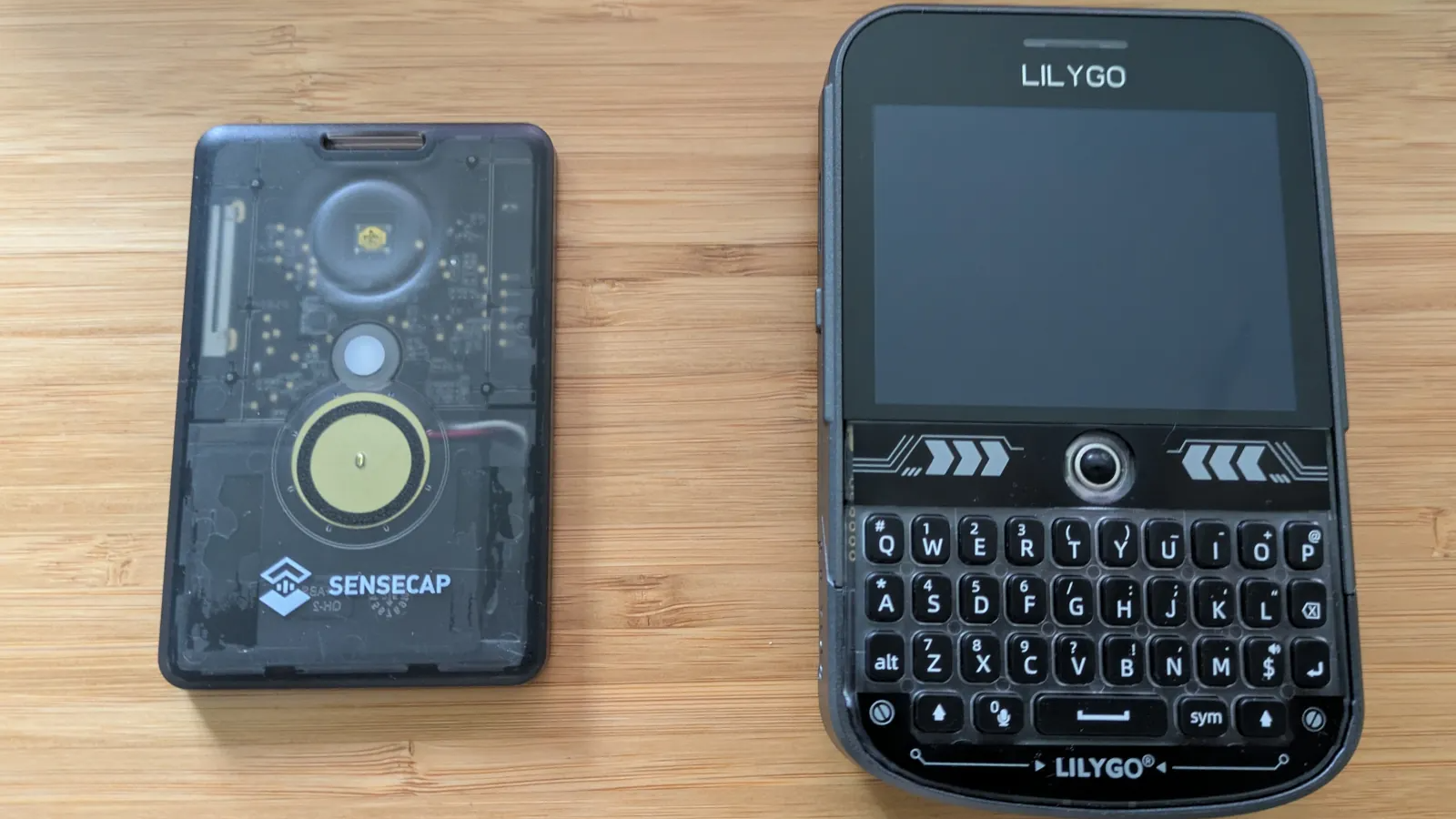
MeshCore sounds like the kind of thing a preparedness nerd, radio hobbyist, or “I swear this drawer of cables is useful” person would love. And honestly? It is. But it is also more practical than it first appears. MeshCore is an off-grid text messaging system built around LoRa radio hardware, letting people send short messages without cellular service, Wi-Fi, home internet, or a monthly bill quietly nibbling at the bank account like a raccoon in the pantry.
After digging into how it works, testing the setup flow, and comparing real-world expectations against radio reality, the biggest takeaway is simple: MeshCore is not a magic walkie-talkie replacement, and it is not a miniature internet. It is something more specific and, in the right situation, more useful: a lightweight, decentralized communication tool for short text messages when normal networks are unavailable, overloaded, expensive, or simply not invited to the party.
What MeshCore Actually Is
MeshCore is an open-source, LoRa-based mesh communication platform designed for secure text messaging over long-range, low-power radios. In plain English, it lets small radio devices pass messages through a network of other devices. Your phone can act as the screen and keyboard, while the LoRa device does the radio work. Some devices can also operate independently, with built-in screens and keyboards.
The “off-grid” part matters. If your phone has no bars, your router is dead, the power is out, or the nearest cell tower is having a bad day, a MeshCore device can still communicate with nearby MeshCore nodes using radio. That does not mean it can message anyone on Earth. It means it can communicate with other nodes that share compatible firmware, radio settings, channels, and reachable paths through the mesh.
Think of it less like replacing your smartphone and more like adding a backup communication layer. It is the text-message equivalent of keeping a flashlight in a kitchen drawer: boring until suddenly it is the most important object in the house.
Lesson 1: Off-grid Messaging Is Useful, But It Is Not Instant Internet
The first lesson is emotional, not technical: lower your expectations before the radios humble you. MeshCore is for short, practical messages. “I am at the trailhead.” “Power is out here.” “Meet at the north gate.” “Repeater is online.” These are perfect. Sending a 19-paragraph family drama update with emojis, GIFs, and a passive-aggressive “k” is not the point.
LoRa is built for range and low power, not speed. That tradeoff is exactly why it works well for off-grid text messaging. It can travel farther than Wi-Fi under the right conditions and can run on modest batteries, but the data rate is limited. When the network is busy, messages may take time. When the path is weak, they may fail. When your antenna is terrible, the radio gods will not save you.
This makes MeshCore feel different from normal messaging apps. You do not measure success by typing speed or read receipts. You measure it by whether a small packet of text made it from one radio to another without borrowing help from Verizon, AT&T, Comcast, or the local coffee shop router named “FBI Surveillance Van 7.”
Lesson 2: Hardware Matters, But Antenna Placement Matters More
Many beginners start with affordable LoRa boards such as Heltec, RAK, LilyGo, or similar supported devices. Some act as companion radios that pair with a phone through Bluetooth. Others, such as keyboard-equipped devices, can operate more like standalone messengers. The entry price can be surprisingly low, which is part of the appeal. You can experiment without taking out a small personal loan or explaining to your spouse why “emergency preparedness” came with overnight shipping.
However, the board itself is only part of the story. Antennas and location often matter more. A cheap node with a decent antenna placed near a window or outside may outperform a nicer device buried inside a backpack, under a desk, next to a metal filing cabinet, or tragically imprisoned behind energy-efficient glass.
Practical antenna lessons
Use the correct antenna for the correct frequency band. In North America, that usually means hardware configured for the 915 MHz ISM band. Do not buy an 868 MHz version meant for Europe and expect it to behave nicely in the United States. Also, do not transmit without an antenna attached. That is a fast way to turn a useful radio into a sad little paperweight with LEDs.
Height is your friend. A repeater on a hill, roofline, upper-floor window, or mast can dramatically change network coverage. LoRa is impressive, but it still obeys physics. Buildings, terrain, trees, vehicles, and your neighbor’s suspiciously overbuilt garage can all reduce performance.
Lesson 3: MeshCore Works Best When You Understand Device Roles
One of MeshCore’s defining ideas is that devices can have specific roles. This is different from some mesh systems where every node repeats everything by default. MeshCore generally encourages a more structured network, which can make scaling cleaner and reduce unnecessary traffic.
Companion nodes
A companion node is the device most people should start with. It pairs with a phone or app and lets you send and receive messages. It is your personal radio interface. In many setups, a companion node does not automatically relay everyone else’s messages. This can feel surprising at first, especially if you arrive from other mesh systems, but it helps prevent messy routing behavior.
Repeaters
A repeater is infrastructure. Its job is to extend range by forwarding traffic through the network. A good repeater is placed high, powered reliably, configured correctly, and then left alone to do its job like the quiet responsible adult at a chaotic family reunion.
Room servers
A room server can help with store-and-forward messaging, especially for community networks. The idea is that users may connect, retrieve unseen messages, and participate in shared rooms or channels. For a neighborhood, club, event, farm, campground, or emergency group, this can be more useful than one-to-one messaging alone.
Lesson 4: Range Claims Need Real-world Translation
LoRa range can sound almost mythical. You will see people talk about miles of coverage, long-distance links, and tiny battery-powered radios reaching across open terrain. Those things can be true. They can also be wildly optimistic if you are testing from a basement next to a washing machine.
The practical range depends on line of sight, antenna quality, transmit power, local noise, terrain, building materials, and whether a repeater is available. Across open land, water, rural roads, or hilltop-to-hilltop paths, MeshCore can be impressive. In dense urban areas, the signal may bounce, fade, and sulk behind concrete.
A useful test is to start small. Put two nodes in the same room. Send a message. Move one node outside. Send another. Walk around the block. Then test from a car, a park, a trail, or a friend’s house. Keep notes. Radio testing without notes becomes folklore very quickly: “I once got three miles from the taco truck” is fun, but not a deployment plan.
Lesson 5: MeshCore Is Not Automatically Better Than Meshtastic
MeshCore is often compared with Meshtastic because both use LoRa devices for off-grid messaging. The comparison is natural, but the winner depends on your area and your goal. Meshtastic has a large user base and a mature ecosystem. MeshCore has been gaining attention because of its routing model, role-based design, and focus on scalable text communication.
If your city already has an active Meshtastic network and almost nobody nearby uses MeshCore, then Meshtastic may be more useful today. A mesh network is a social technology as much as a radio technology. The best protocol on paper is not very helpful if you are the only person using it within radio range. Congratulations, you have invented texting yourself in the woods.
On the other hand, MeshCore can shine when a group deliberately builds around it: a neighborhood preparedness group, outdoor club, volunteer team, school safety group, farm operation, search-and-rescue support team, or local radio community. When repeaters and room servers are planned instead of randomly scattered, the system begins to feel less like a gadget and more like resilient local infrastructure.
Lesson 6: Setup Is Friendly, But Tiny Mistakes Still Bite
The setup process is far more approachable than old-school radio tinkering. In many cases, you flash firmware, pair the device with the MeshCore app, configure the radio settings, join or create a channel, and start testing. That said, several beginner mistakes show up again and again.
Use a real data cable
Some USB cables only provide power and do not carry data. They look innocent. They are not. If your computer refuses to see the device during flashing, try another cable before blaming the firmware, the board, your laptop, or Mercury in retrograde.
Match your region and frequency
Radio settings need to match the local network. Frequency, bandwidth, spreading factor, channel configuration, and firmware role all matter. If your device is configured differently from everyone else, it may technically be working while communicating with absolutely no one. This is the radio version of showing up to the right party on the wrong night.
Give discovery time
Node discovery may not feel instant. Devices advertise themselves, contacts appear over time, and the app may need a few minutes to settle. Be patient during tests. A mesh network is not a slot machine; violently refreshing the app does not improve the odds.
Lesson 7: Power Planning Is Part of the System
MeshCore devices are low power, but “low power” does not mean “powered by vibes.” Portable nodes need batteries. Fixed repeaters need dependable power. Outdoor infrastructure may need solar panels, charge controllers, weatherproof enclosures, and batteries that can tolerate local temperatures.
For everyday carry, a small companion device can be charged like any other gadget. For emergency kits, charge it monthly and store the right cable with it. For repeaters, think like a boring infrastructure engineer. How long should it run without sun? Can rain get into the enclosure? Is the antenna strain-relieved? Will the battery survive winter? Can someone reach it for maintenance without using a ladder in a thunderstorm?
The dream is a self-contained repeater quietly extending coverage from a high point. The nightmare is a “mission critical” node zip-tied to a fence with a half-charged battery and the weather resistance of a paper lunch bag.
Lesson 8: Privacy Is Stronger Than Normal Radio, But Do Not Get Reckless
MeshCore emphasizes encrypted messaging, which is a major advantage over ordinary open radio chatter. Private channels and direct messaging can help keep communications limited to intended participants. That said, users should still be realistic. Radio transmissions can be detected. Metadata, timing, location patterns, and operational habits can reveal more than people expect.
For family coordination, hiking groups, event teams, and local preparedness, MeshCore offers a useful privacy layer. For highly sensitive communications, treat it as one part of a broader security plan, not a magic invisibility cloak. Good security also means protecting devices, using sensible channel settings, updating firmware, avoiding oversharing location, and not broadcasting your entire emergency plan to a public room because the app made it feel like a group chat.
Lesson 9: MeshCore Belongs in an Emergency Plan, Not Instead of One
Cellular outages, storm damage, overloaded networks, rural dead zones, and power failures are all reminders that modern communication is convenient but fragile. MeshCore can help fill a gap, especially for local text communication when traditional networks are unavailable. But it should not be your only plan.
Keep phone chargers, battery banks, printed contact lists, meeting places, emergency alerts, and a basic family communication plan. MeshCore is excellent for local resilience, but it does not replace 911, satellite messengers, weather radios, amateur radio networks, or official emergency instructions. The best preparedness setup uses layers. If one fails, another still works.
A realistic household setup might include two companion nodes for family members, one small repeater at home or with a trusted neighbor, printed instructions in the emergency kit, and a monthly test message. That is not dramatic. It will not look cool in a movie. It may, however, be exactly what you need when the power is out and the cell network is impersonating a brick.
Recommended Beginner Setup
If you are trying MeshCore for the first time, start with two or three compatible devices instead of one. One radio is a curiosity. Two radios are a test. Three radios let you begin experimenting with range, routing, and practical placement.
- Two companion nodes: Good for testing direct communication between family members or friends.
- One repeater: Place it high to extend coverage and learn how infrastructure affects performance.
- Correct antennas: Match the region and device frequency.
- Battery banks: Keep portable nodes alive during outages or trips.
- Simple message plan: Agree on short, useful messages before an emergency.
Do not wait for a disaster to test the system. Try it on a normal Saturday. Walk the neighborhood. Visit a park. Put one node upstairs and one in a car. Test from a grocery store parking lot. The time to discover your antenna is wrong is not during a storm while holding a flashlight in your mouth.
Extra Field Notes: What Trying MeshCore Teaches You After the First Week
The most interesting part of trying MeshCore is how quickly it changes your understanding of communication. At first, it feels like a gadget project. You flash firmware, pair a device, rename a node, and feel a tiny burst of victory when the first message goes through. It is the same feeling as fixing a printer, except nobody involved has aged seven years.
Then the second phase begins: you start walking around. Suddenly your neighborhood becomes a radio map. That tall apartment building is no longer just “the tall apartment building.” It is potential repeater territory. The hill by the school becomes interesting. The park with open sightlines becomes a testing ground. The metal roof on the shed becomes a villain. You begin thinking in elevation, obstruction, and antenna placement.
The biggest experience-based lesson is that MeshCore rewards preparation more than improvisation. A random node in a drawer is useful only if it is charged, configured, labeled, and understood by the people expected to use it. A family member who has never opened the app will not magically become a mesh communications operator during a blackout. If the goal is emergency communication, everyone needs at least one practice session. Keep it simple: turn on the device, open the app, connect, send a message, read a reply, charge it afterward.
Another lesson is that short messages are a feature, not a flaw. When communication is limited, people become clearer. “At home. Safe. Power out. Need ice.” That is better than a 400-word explanation of the refrigerator’s emotional journey. MeshCore encourages concise, purposeful communication, which is exactly what a backup system should do.
Testing also exposes the difference between a personal gadget and a community network. One household can use MeshCore for local coordination, but the real magic appears when multiple people contribute nodes and repeaters. A neighborhood with three well-placed repeaters is far more useful than ten people carrying companion nodes that never hear each other. Community planning matters. Shared settings matter. Documentation matters. A small printed card with channel details can prevent a lot of confusion.
There is also a social lesson hiding inside the technical one: people get excited when they see a message travel without cell service. It feels slightly rebellious, like passing a note under the door of the internet. That excitement is useful because it motivates people to learn, test, and build coverage. But excitement should be paired with realism. MeshCore will not stream video. It will not guarantee delivery through every building. It will not replace professional emergency systems. It is a resilient local text layer, and that is already valuable.
The final experience is surprisingly satisfying: once the system works, it becomes quiet. A good MeshCore setup is not flashy. It sits in a bag, on a shelf, in a vehicle, or on a rooftop repeater box, ready to do a narrow job well. That narrow job may be boring most days. During an outage, a camping trip, a rural event, or a local emergency, boring can become beautiful.
Final Verdict
MeshCore is worth trying if you care about off-grid communication, emergency preparedness, local resilience, outdoor coordination, or simply learning how radio-based text messaging works. It is affordable enough for hobbyists, structured enough for community networks, and practical enough to belong in a serious backup communication plan.
The main lessons are clear: buy compatible hardware, use the right regional frequency, do not cheap out on antennas, test before you need it, place repeaters high, keep messages short, and build with other people. Mesh networks become more valuable as participation increases. One node is a toy. Several nodes are a tool. A planned local network is infrastructure.
MeshCore will not replace your smartphone. It will not make you immune to physics, bad antennas, dead batteries, or poor planning. But when the usual networks fail, it can give you something precious: a way to send a simple message through the air, without asking permission from a tower, router, subscription plan, or cloud service.
Note: MeshCore firmware, apps, hardware support, and local network settings can change quickly. Before publishing deployment advice or building an emergency communication system, verify current device compatibility, regional radio rules, and community channel settings.