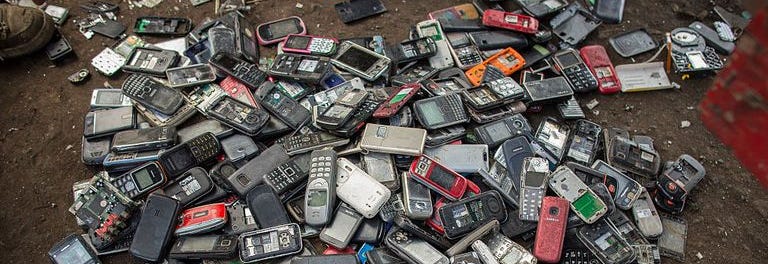
Somewhere in America, a kitchen drawer is currently hosting a retirement party for three old cell phones, two mystery chargers, one cracked screen protector, and a USB cable nobody has trusted since 2017. If that drawer is yours, congratulations: you own a tiny museum of modern technology. The good news is that old cell phones do not have to sit there forever like digital fossils.
Knowing what to do with old cell phones can save you money, protect your personal data, help someone in need, and keep valuable materials out of landfills. Whether your retired phone is a recent iPhone, a loyal Android, a flip phone with emotional support value, or a device so old it remembers when ringtones were a personality, you have several smart options.
This guide explains how to sell, trade in, donate, repurpose, or recycle old cell phones responsibly. Before you send any device into its next chapter, however, there is one rule that matters more than everything else: wipe your data first. Your photos, passwords, banking apps, text messages, contacts, and saved accounts should not go on an unexpected road trip with your old phone.
Why You Should Not Throw Old Cell Phones in the Trash
Throwing an old phone into the trash may feel simple, but it is the worst ending for a device that still contains useful parts. Cell phones include metals such as copper, gold, silver, and palladium, along with plastics, glass, circuit boards, and lithium-ion batteries. When phones are recycled correctly, some of these materials can be recovered and reused. When phones are tossed into ordinary garbage, those resources are wasted.
There is also a safety issue. Most modern phones contain lithium-ion batteries. If damaged, crushed, overheated, or handled carelessly, these batteries can become hazardous. That is one reason phones should not go into curbside recycling bins or household trash. A phone is not a soup can wearing a screen; it needs a dedicated electronics recycling route.
In some cities and states, electronics disposal rules are stricter than people expect. Certain electronics may be banned from regular trash, and local recycling programs may have specific drop-off locations or collection days. The safest approach is to check your city, county, or state waste-management website before disposal.
Step One: Prepare Your Old Phone Before Letting It Go
Before you sell, donate, trade in, or recycle a phone, take a few minutes to clean up your digital life. This is the part that sounds boring until you imagine a stranger scrolling through your vacation photos, old group chats, and saved autofill information. Suddenly, boring looks beautiful.
Back Up Important Data
Start by backing up photos, videos, contacts, notes, and files you want to keep. iPhone users can use iCloud, a Mac, or a PC backup. Android users can use Google services, a computer transfer, or manufacturer tools such as Samsung Smart Switch. Make sure your must-have memories are safely stored somewhere else before resetting the device.
Sign Out of Accounts
Next, sign out of Apple ID, Google, Samsung, banking apps, email, social media, password managers, and any work or school accounts. Disable tracking features such as Find My iPhone or Find My Device, because many trade-in and donation programs cannot process a phone that is still locked to your account.
Remove SIM and Memory Cards
If your phone has a physical SIM card, remove it. If you are not reusing that SIM card, destroy it before discarding it. Some Android phones also have microSD cards, which may contain photos, downloads, and other files. Remove the card and either reuse it, wipe it, or destroy it if it is no longer needed.
Perform a Factory Reset
After backing up and signing out, perform a factory reset. On iPhone, use the “Erase All Content and Settings” option. On Android, look for the reset option under system settings. Newer phones usually use encryption, and a proper reset helps make personal data inaccessible. Still, the safest habit is to remove accounts, delete sensitive apps, and reset the phone before it leaves your possession.
Clean the Phone Physically
Remove the case, wipe the screen, and check the charging port for dust. Do not use excessive liquid. If you are selling or trading in the phone, a clean device may make a better impression. If you are recycling it, cleaning is still polite. Even old technology deserves a tiny spa day.
Option 1: Trade In Your Old Cell Phone
If your phone is still relatively modern and functional, a trade-in may be the easiest choice. Many manufacturers, wireless carriers, and retailers offer trade-in programs. Depending on the phone model, storage capacity, condition, and current promotions, you may receive store credit, a gift card, or credit toward a new device.
Trade-in programs are especially useful for recent iPhones, Samsung Galaxy phones, Google Pixel devices, and other popular smartphones. A cracked screen, weak battery, or old model may reduce the value, but it is still worth checking. Even if the phone has no resale value, some programs will recycle it for free.
The advantage of trade-ins is convenience. You usually answer a few questions online, get an estimate, ship the phone or bring it to a store, and receive credit after inspection. The disadvantage is that trade-in offers are not always the highest price. You are often trading maximum profit for speed and simplicity.
Option 2: Sell Your Old Phone for Cash
If you want more money and do not mind a little effort, selling your old phone may beat a trade-in. You can sell directly through online marketplaces, local listing platforms, or phone-buyback companies. Some kiosk services also offer instant cash for used phones and tablets.
Before selling, research your exact model. A phone’s value depends on brand, storage size, carrier lock status, battery health, cosmetic condition, and whether it comes with original accessories. An unlocked phone usually sells for more because buyers can use it with more carriers.
Take clear photos of the front, back, sides, screen, camera lenses, and any damage. Be honest about scratches, cracks, battery issues, or charging problems. A truthful listing may attract fewer complaints and fewer awkward messages from buyers who treat a tiny scuff like a courtroom event.
If you sell locally, meet in a safe public place and avoid sharing unnecessary personal information. If you ship the phone, use tracking and pack it well. Always reset the device and remove it from your account before handing it over.
Option 3: Donate Old Cell Phones
Donation is one of the best answers to the question of what to do with old cell phones. A phone that feels outdated to you may still help someone else make emergency calls, access services, apply for jobs, or stay connected with family.
Some nonprofits collect phones for domestic violence survivors, senior centers, veterans, active-duty military members, low-income families, or community programs. Other organizations sell donated phones to raise funds for their missions, then recycle devices that cannot be reused.
Donation works best when the phone still powers on, holds a charge, and can be reset. However, some organizations accept damaged or non-working phones for parts or recycling. Always check the donation program’s requirements before mailing or dropping off your device.
What Accessories Should You Include?
If you still have the charger, cable, case, or original box, include them only if the program accepts accessories. A working charger can make a donated phone more useful, but random cable spaghetti may not be welcome everywhere. When in doubt, ask first.
Option 4: Repurpose an Old Cell Phone at Home
Not every old phone has to leave the house. If it still works, you can turn it into a useful mini-device. Repurposing extends the phone’s life and may save you from buying another gadget.
Use It as a Backup Phone
Keep one old phone as an emergency backup. It can be helpful if your main phone breaks, gets lost, or needs repair. Even a phone without an active service plan can usually call emergency services if it has battery power and signal access.
Turn It Into a Dedicated Music Player
An old phone can become a music player for workouts, road trips, garage projects, or cooking. Load it with playlists, podcasts, or audiobooks, connect it to Bluetooth speakers, and stop risking your expensive new phone near flour, paint, or suspicious gym benches.
Use It as a Security Camera or Baby Monitor
With the right app and a stable Wi-Fi connection, an old smartphone can work as a simple indoor camera, pet monitor, or baby monitor. This is useful for checking on a dog who definitely did not eat the couch pillow, except the evidence says otherwise.
Create a Smart Home Remote
If you use smart lights, speakers, thermostats, or streaming devices, an old phone can become a dedicated home-control remote. Leave it near the couch or kitchen and use it to control devices without draining your main phone’s battery.
Use It for Kids’ Offline Entertainment
An old phone can become a controlled, offline entertainment device for children, loaded with approved games, educational apps, music, or videos. Keep parental controls on, remove payment methods, and disable unnecessary features.
Make It a Travel Device
Use an old phone for offline maps, translation apps, itinerary PDFs, e-books, or travel photos. This can reduce the risk of losing your main phone during a trip. It is also handy for long flights, where battery life becomes a competitive sport.
Option 5: Recycle Old Cell Phones Responsibly
If your phone is broken, too old to sell, or no longer safe to use, recycling is the right move. Look for electronics recycling programs through retailers, manufacturers, municipal recycling centers, or certified e-waste recyclers.
Large electronics retailers often accept phones for recycling. Manufacturers may offer mail-in programs or store drop-off options. Recycling directories can help you find nearby locations by ZIP code. Some carrier stores also provide recycling options for phones and accessories.
Do not put phones in your curbside recycling bin unless your local program specifically says it is allowed. Most curbside programs are not designed for electronics, batteries, and small devices. A phone tossed into a regular recycling truck may create safety problems and contaminate the recycling stream.
Choose a Trustworthy Recycler
When possible, choose programs that explain what happens to devices after collection. Responsible recyclers sort phones for reuse, parts recovery, material recovery, or safe disposal. Business owners handling company phones should consider recyclers that provide documentation for data destruction and recycling.
What If the Phone Is Damaged or Has a Swollen Battery?
A cracked screen is usually not a big problem. A swollen battery is different. If the phone case is bulging, the screen is lifting, the device smells strange, or the battery looks expanded, stop using the phone and do not charge it. Do not press, puncture, bend, or mail it casually.
Contact a local electronics recycler, municipal hazardous waste program, battery recycling program, or repair shop for safe handling instructions. A swollen lithium-ion battery should be treated carefully. This is not the moment to “see what happens.” Curiosity is wonderful; battery experiments are not.
How to Decide the Best Option
The best choice depends on the phone’s condition and your goal. If the device is newer and valuable, sell or trade it in. If it is functional but not worth much, donate it. If it still solves a problem at home, repurpose it. If it is broken, unsafe, obsolete, or locked beyond recovery, recycle it responsibly.
Here is a simple decision guide:
- Worth money: Sell it or trade it in.
- Works but low value: Donate it to a nonprofit or community program.
- Still useful at home: Repurpose it as a camera, music player, remote, or backup phone.
- Broken or outdated: Recycle it through an electronics program.
- Battery is swollen: Handle it as a safety issue and contact a proper recycling or hazardous waste program.
Common Mistakes to Avoid
The first mistake is forgetting to erase personal data. A phone is not just hardware; it is a pocket-sized diary with passwords. The second mistake is leaving activation locks turned on, which can make the device useless to the next person. The third mistake is assuming a cracked or old phone has no value. Parts, metals, and repair potential still matter.
Another mistake is hoarding phones “just in case” without a plan. Keeping one backup device is smart. Keeping nine backups, including one that charges only when held at a 37-degree angle under a full moon, may be a sign that the drawer has taken control.
Real-World Experiences: What People Learn From Old Cell Phones
Most people do not think seriously about old cell phones until they clean a drawer, move apartments, upgrade a family plan, or find a device that still has a photo of a meal they ate six years ago. The experience is usually the same: surprise, nostalgia, confusion, and then the big questionwhat now?
One common experience is discovering that an old phone is worth more than expected. A person may assume a three-year-old phone is basically ancient, only to learn that it still has trade-in value. Popular flagship phones often hold value better than budget models, especially if they are unlocked and in good condition. That surprise credit can make a new phone purchase hurt a little less. It will not feel like finding buried treasure, but it may feel like finding a forgotten gift card in a winter coat.
Another experience is realizing how much personal data remains on a retired device. People often power up an old phone and find saved photos, notes, text messages, email accounts, and app logins. This moment is useful because it reminds us that digital cleanup should be part of every upgrade. A good habit is to treat phone retirement like moving out of an apartment: take your valuables, lock the doors, and do not leave your diary on the kitchen counter.
Families often find that repurposing old phones solves small household problems. A parent may turn an old phone into a child’s music player for car rides. Someone else may use one as a kitchen recipe screen, so their main phone does not get dusted with flour. Pet owners sometimes use retired phones as simple cameras to check whether the cat is sleeping peacefully or plotting against the curtains. These uses are not glamorous, but they are practical, and practical is underrated.
Donating old phones can also feel surprisingly meaningful. Many people like knowing that a device they no longer need may help someone call for assistance, connect with a support service, or stay in touch during a difficult time. It turns a forgotten gadget into a small act of usefulness. The phone may not be the latest model, but connection does not always require the newest camera or fastest processor.
Recycling teaches another lesson: small devices add up. One phone in one drawer seems harmless. Millions of phones sitting unused across the country represent a large amount of recoverable material and preventable waste. Recycling a phone will not single-handedly save the planet, but it is one of those simple actions that becomes powerful when enough people do it.
The best experience comes from creating a routine. Every time you upgrade, decide what happens to the old device within a week. Back it up, wipe it, remove cards, and choose: sell, trade in, donate, repurpose, or recycle. Do not let the phone enter the drawer unless it has a job. “Existing mysteriously beside expired coupons” is not a job.
Conclusion
Old cell phones do not belong in the trash, and they do not have to live forever in a junk drawer. A used phone can become cash, store credit, a donation, a home gadget, an emergency backup, or a responsibly recycled source of valuable materials. The right choice depends on the phone’s condition, age, safety, and usefulness.
The most important step is preparation. Back up your data, sign out of accounts, remove SIM and memory cards, disable device locks, and perform a factory reset. After that, choose the route that gives your phone the best second life. Your old cell phone may be retired from your pocket, but it can still work, help, teach, or be recycled into something useful. Not bad for a gadget that once survived drops, updates, group chats, and at least one suspicious puddle.