
Ever wonder why a seemingly clean kick in a fighting game phases right through your opponent, or how a rival player always seems to clip you from an impossible distance? The secret lies under the hood of every competitive fighter, where a precise hitbox collision explanation reveals the invisible geometry driving the entire genre. To the casual observer, fighting games are a dazzling display of martial arts animation. To a competitive player, however, they are high-speed mathematical chess matches governed by invisible boxes, spatial zones, and unforgiving timing windows.
Mastering these underlying mechanics is the single most effective way to transition from button-mashing to deliberate, tactical play. Whether you are trying to execute flawless frame data analysis to understand your attacks or simply want to stop getting hit by phantom limbs, understanding how game engines calculate collisions changes everything. In this guide, you will learn the exact anatomy of collision boxes, how developers manage spatial priority, and how you can leverage this technical knowledge to elevate your competitive strategy.
1. Understanding Hitbox Collision Explanation and Core Game Architecture
Fighting games operate on strict, invisible rules that dictate every interaction on screen. To truly understand how competitive matches are won and lost, you need a precise hitbox collision explanation that goes beyond basic button mashing. Behind the fluid character animations and flashy special moves lies a rigid mathematical grid where shapes dictate success or failure.
1.1 The Anatomy of Collision: Hitboxes, Hurtboxes, and Pushboxes
Game engines rely on distinct spatial zones to govern how characters interact with one another. These invisible shapes are categorized into three primary types, each serving a unique mechanical function during a match.
1.1.1 Defining Hitboxes as Offensive Spatial Zones
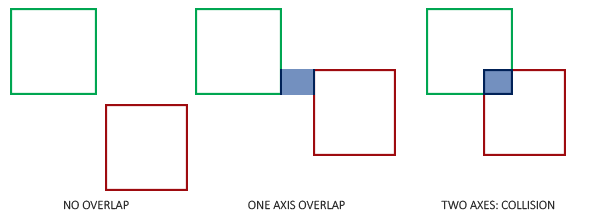
A hitbox represents the active, offensive area of an attack. When a character throws a punch or a fireball, the game engine generates a shape over the limb or projectile. If this spatial zone intersects with an opponent’s vulnerable area, the game registers a successful strike.
1.1.2 Defining Hurtboxes as Vulnerable Character Regions
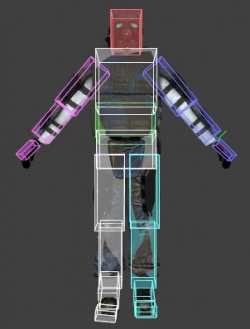
Hurtboxes cover the physical body of a fighter. This is the region that can receive damage. If an opponent’s offensive zone overlaps with your character’s hurtbox, you take damage or enter a block stun state. Manipulating the positioning of these regions through crouching or leaping is vital for dodging incoming pressure.
1.1.3 Defining Pushboxes for Character Spacing and Displacement
Pushboxes prevent fighters from occupying the exact same space on the screen. These cylindrical or rectangular boundaries manage physical displacement, ensuring characters maintain realistic spacing and cannot clip through each other during close-quarters combat.
1.2 Technical Foundations of Collision Geometry
Calculating physics interactions in real-time requires immense processing efficiency, especially in fast-paced fighting games running at 60 frames per second.
1.2.1 Why Developers Use Primitives Over Dynamic Meshes
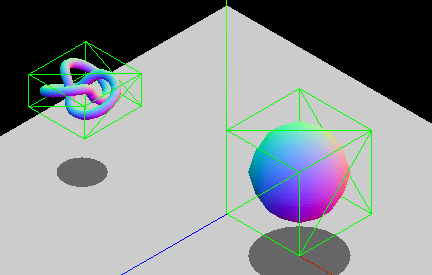
Instead of calculating collisions using complex character polygon meshes—which would cause massive performance drops—developers use simple geometric primitives like boxes, spheres, and capsules. These basic shapes allow the engine to compute spatial intersections instantly, ensuring zero input lag during intense competitive exchanges.
1.2.2 Processing Priority: How Game Engines Calculate Simultaneous Collisions
When two attacks connect on the exact same frame, the game engine relies on internal priority systems and trade windows to determine the outcome. It evaluates the collision boxes sequentially based on pre-programmed character data, system mechanics, and move properties to resolve the interaction cleanly.
1.3 The Lifecycle of an Attack and Frame Data Integration
Every offensive maneuver in a fighting game follows a strict temporal sequence. Mastering Frame Data Analysis: Mastering Hitboxes and Combo Timings allows players to break down this lifecycle into predictable, exploitable phases.
1.3.1 Analyzing Startup Frames and Initial Vulnerability
The startup phase begins the moment you press an attack button. During these initial frames, your character’s hurtboxes often expand or shift forward while no active hitbox has been generated yet, leaving you completely vulnerable to faster interruptions.
1.3.2 Identifying Active Frames for Successful Connection
Active frames represent the narrow window where the hitbox is actually live and capable of causing damage. Precision timing is required to ensure this window aligns with the opponent’s hurtbox before the attack transitions into its concluding phase.
1.3.3 Interpreting Recovery Frames and Potential Punishment Windows
Once active frames expire, the character enters recovery frames while returning to a neutral stance. If an attack misses entirely—known as a whiff—these lingering recovery frames create a massive vulnerability window that alert opponents can easily exploit for heavy counterattacks.
2. Mastering Competitive Strategy Through Hitbox Interaction Analysis
2.1 Advanced Defensive and Offensive Positioning Tactics
2.1.1 Exploiting Disjointed Hitboxes for Zoning Dominance
Disjointed hitboxes occur when a character’s offensive collision box extends far beyond their vulnerable hurtbox, often seen when wielding weapons like spears or heavy swords. This geometric separation grants immense utility during **zone control fundamentals**, allowing players to stuff approaching attacks safely without risking counter-hits to their own body. Recognizing these spatial advantages transforms neutral exchanges into calculated territory gains.
2.1.2 Navigating Invulnerability Frames and Intangibility States
Certain special moves and defensive options grant frames where a character’s hurtbox is entirely deactivated. Mastering these windows requires meticulous **frame data analysis** to ensure defensive maneuvers cleanly pass through active offensive collision boxes without trading damage or eating a heavy punish.
2.1.3 Mastering Low-Profile and High-Profile Movement to Bypass Hitboxes
Ducking or jumping changes a character’s physical posture, dynamically shifting hurtboxes downward or upward. Competitors can exploit these height modifications to slip entirely underneath high-flying projectiles or duck horizontal slashes, completely invalidating an opponent’s offensive momentum.
2.2 Practical Training for Hitbox Mastery
2.2.1 Interpreting Built-in Visualizers and Color Coding Standards
Modern training modes offer visual collision overlays where red boxes usually designate active attacks, blue boxes represent vulnerable hurtboxes, and green boxes indicate pushboxes. Studying these color-coded boundaries removes guesswork from spacing drills and clarifies why certain close-range interactions fail or succeed.
2.2.2 Designing Drills for Whiff Punishing and Spacing
Improving reaction times relies on understanding **counter attack timing** when an opponent’s attack misses its mark. Training partners should program dummy opponents to throw sweeping normals at specific ranges, forcing players to react instantly with extended punishes the moment those offensive boxes expire.
2.2.3 Utilizing Frame Data to Create Optimal Setups and Okizeme Traps
Applying pressure on a waking-up opponent requires precise timing derived from frame advantages. By aligning active frames to hit precisely on the first actionable frame of an opponent’s recovery, players establish airtight okizeme situations that bypass reversal attempts entirely.
2.3 Addressing Common Player Questions
2.3.1 Explaining Perception Gaps in Long-Range Attacks
Visual animations often deceive players regarding true reach. A character’s animation might make a foot or weapon look lethal, but if the underlying hitbox data terminates prematurely, the move will miss, illustrating why technical numbers always override visual fidelity in high-level play.
2.3.2 Comparing Box-Based Systems Versus Capsule-Based Systems
Developers choose between rigid rectangular boxes and smooth rounded capsules to envelop character models. Capsule shapes naturally contour around limbs and curved torso animations, whereas box systems offer sharper, more predictable geometric intersections for competitive balance.
2.3.3 Evaluating the Strategic Impact of Sword-User Priority
Because weapon-wielding characters typically feature larger, disjointed hitboxes, they dictate the spacing tempo of the match. For more on optimizing your execution during these tense neutral exchanges, check out this guide on frame data analysis to refine your counter-attack timing.
Mastering fighting games goes far beyond executing complex button combinations or memorizing long strings of attacks. At the highest level of competitive play, success comes down to a deep, intuitive understanding of spatial awareness governed by engine geometry, active frames, and collision boxes. By breaking down how developers map offensive hitboxes, vulnerable hurtboxes, and physical pushboxes, players can transform their approach from pure guesswork to precise, calculated execution.
Whether you are looking to improve your reaction speeds for a reliable counter attack timing window or trying to optimize your defensive spacing against aggressive zoning characters, treating game mechanics as a predictable science is the ultimate key to leveling up. Study your favorite character’s visualizers, respect the startup and recovery phases of every normal, and always consider the temporal data behind your inputs. To dive deeper into the rhythmic foundations of competitive play, check out our guide on frame data analysis to refine your execution and dominate the neutral game.